
更新日志
温馨提示
本次更新请记得更新 print-lock.css 打印样式
2026-09-28
sv-print@0.2.25@sv-print/hiprint@0.3.41@sv-print/plugin-view-ai@0.1.0@sv-print/plugin-view-data-source@0.1.0@sv-print/plugin-view-ele-tools@0.1.0@sv-print/plugin-ele-seal@0.1.0@sv-print/plugin-ele-pdf@0.1.0@sv-print/plugin-api-pdf-vector@0.1.0@sv-print/plugin-api-word@0.1.0@sv-print/plugin-options-modify@0.1.4@sv-print/plugin-ele-shtml@0.1.16@sv-print/plugin-api-excel@0.1.4
- 🌈 新增 view-ai 插件(AI 辅助设计): 自然语言生成模板 JSON/打印数据, provider/proxy/customService 三种连接模式(可同时配置, 运行时切换), 流式响应, 图片输入, AI 工具调用.
- 🌈 新增 view-data-source 数据源插件: 多数据源字段树, 拖拽/点选绑定字段, 从数据源取数打印.
- 🌈 新增 view-ele-tools 元素选中工具集插件: 元素上方悬浮工具栏, 支持自定义工具与尺寸标签.
- 🌈 新增 ele-seal 骑缝章元素插件: 按实际渲染页数切分章图, 逐页在纸边显示, 拼合还原完整章图.
- 🌈 新增 ele-pdf 元素插件: 渲染 pdf 文件(url/base64/dataURL), 流式分页, 文字叠加层, 页码范围.
- 🌈 新增 api-pdf-vector 插件 导出矢量 pdf: 文字可选中/可搜索/可复制, 矢量图形, 字体子集嵌入.
- 🌈 新增 api-word 插件: 导出可编辑 docx 文档.
- 🌈 新增 表格 右键菜单 编辑表头 & 移除原有 columns 排序、显示隐藏表头.
- 🌈 新增 设计器 支持 Alt + Wheel/+/- 缩放画布 & 同步更新快捷键说明.
- 🌈 新增 日志/错误 上报功能.
- 🌈 新增 shtml 插件 分页前处理函数.
- ✨ 优化 hook beforeGetHtml,beforePrint,beforePrint2 回调 data & 支持异步.
- ✨ 优化 api-excel 插件: 新增 customTypeResolver/onBeforeWrite/multiSheet/pageGap 参数, 文本重叠、换行效果, 导出还原度更高.
- ✨ 优化 dragbox 支持 cache 缓存拖拽后的位置; 面板尺寸变化 标尺更新;
- ✨ 优化 showModal content 支持 html 字符串. showModal 未传递 submit 异常.
- ✨ 优化 预览组件 支持缩略图 & 样式.
- ✨ 优化 create-sv-print-plugin cli 支持创建 dev 环境, 方便调试插件.
- ✨ 优化 表格分页逻辑(首页空行、表格头处理), 合并删除行, 标题双击下拉选择源.
- ✨ 优化 拖动方向: 键盘移动、框选移动、元素超出画布时的处理; 指定拖动方向时不处理吸附.
- ✨ 优化 样式 & 默认字体;
- ✨ fix 框选元素 鼠标移动元素 bug.
- ✨ fix 水印内容 编辑器编辑修改失败问题.
- ✨ fix 单元格渲染函数 placeholder 错误.
- ✨ fix 表格 合并行 删除行问题.
🎮 代码示例(详细请看各个插件文档)
import '@sv-print/plugin-view-ai/dist/style.css';
import pluginViewAi from '@sv-print/plugin-view-ai';

const plugins = [
  pluginViewAi({
    // proxy 轻量代理模式: 服务端注入 API Key, 生产环境防泄露
    proxy: {
      proxyUrl: 'https://my-server.com/api/ai/proxy',
      targetBaseUrl: 'https://api.openai.com/v1',
      model: 'gpt-4o',
      // 从接口动态拉取模型列表 (优先级高于 models, 失败时回退)
      modelsUrl: 'https://my-server.com/api/ai/models',
    },
    showPromptManager: true, // 显示提示管理器
    enableImageInput: true, // 支持 Ctrl+V 粘贴/上传/拖拽图片
    defaultShow: false, // 默认不显示
    icon: 'sv-ai',
  }),
];import '@sv-print/plugin-view-data-source/dist/style.css';
import dataSourcePlugin, { parseData } from '@sv-print/plugin-view-data-source';
const plugins = [
dataSourcePlugin({
sources: [
{
name: 'default',
title: '默认数据源',
data: parseData(printData), // 解析打印数据为字段树
rawData: printData, // 原始打印数据
},
{
name: 'user',
title: '用户数据',
defaultExpand: true, // 默认展开
// 接口方式获取字段
request: { url: '/api/user/fields', dataPath: 'data.list' },
},
{
name: 'order',
title: '订单数据',
defaultExpand: false, // 默认折叠, 点击后懒加载
// 自定义函数获取字段 (优先级最高)
fetcher: async () => {
const res = await fetch('/api/order/schema');
return (await res.json()).fields;
},
},
],
pickerMultiple: true, // 多选模式
pickerCloseOnSelect: false, // 多选模式下选后不关闭弹窗
onFieldSet: (field, element, optionName) => {
console.log(field, element, optionName);
if (field.type === 'object') {
designerUtilsIns.showModal({
title: '提示',
content: '请不要选择 object 字段类型',
showCancel: false,
submitText: '知道了',
});
return false;
}
const { type } = element.printElementType;
if (optionName === 'field') {
if (['table', 'box'].some((item) => type.includes(item)) && field.type !== 'array') {
designerUtilsIns.showModal({
title: '提示',
content: '表格(table) 或 子模板元素(box) 需要数组类型',
showCancel: false,
submitText: '知道了',
});
return false;
}
}
if (optionName === 'columnField') {
if (field.type === 'array') {
designerUtilsIns.showModal({
title: '提示',
content: '表格(table)列字段名不能是数组类型',
showCancel: false,
submitText: '知道了',
});
return false;
}
}
return true;
},
}),
];
// 刷新数据源
// designerUtils.dataSource.refresh("user");import pluginEleSeal from '@sv-print/plugin-ele-seal';
const plugins = [pluginEleSeal()];
// 注册后左侧"插件"分组出现"骑缝章"元素, 拖入模板即可
// 章图来源: field 打印数据字段 > src 直接配置的图片地址
// pageRange 盖章页范围: "all" | "first:3" | "1-3,5" | "odd" | "even"import pluginElePdf from '@sv-print/plugin-ele-pdf';
const plugins = [pluginElePdf()];
// 元素参数: pdfUrl 数据源 | pdfPageRange 页码范围如 "1,3,5-8"
// pdfOverlays 叠加层支持 #{field} 与 #{pdfMeta.xxx} 占位符import pluginApiPdfVector from '@sv-print/plugin-api-pdf-vector';
// 需一并安装 peerDependency: @imggion/html2realpdf
const plugins = [pluginApiPdfVector({})];
let printData = { name: '张三' };
// 1. 直接下载
await hiprintTemplate.toVectorPdf(printData, { name: 'pdf名称' });
// 2. 获取 blob 自行处理
const res = await hiprintTemplate.toVectorPdf(printData, {
isDownload: false,
type: 'blob', // blob、arraybuffer、bloburl、datauristring
onProgress: (cur, total, phase) => {
// phase: "snapshot" | "wasm" | "complete"
console.log('进度', phase, cur, total);
},
});import pluginApiWord from '@sv-print/plugin-api-word';
const plugins = [pluginApiWord()];
// editable(默认): 网格表格还原, 文本/表格/图片在 Word 中原生可编辑
template.toWord(printData, { mode: 'editable', name: '出库单' });
// positioned: 浮动定位, 所见即所得还原设计位置
template.toWord(printData, { mode: 'positioned' });
// 不自动下载, 拿到 Blob 自行上传
template.toWord(printData, { isDownload: false }).then((blob) => {
const form = new FormData();
form.append('file', blob, 'report.docx');
return fetch('/api/upload', { method: 'POST', body: form });
});import pluginViewEleTools, { getDefaultTools } from '@sv-print/plugin-view-ele-tools';
const plugins = [
pluginViewEleTools({
showSizeBox: true, // 元素底部显示尺寸标签 + 微调按钮
sizeBoxUnit: 'mm',
sizeBoxStep: 5,
// 按元素类型自定义工具
resolveTools: (ctx) => {
if (ctx.elementType === 'text') {
return [
...getDefaultTools(),
{
key: 'my-extra',
title: '自定义',
icon: 'svicon sv-font-big',
click: (ctx) => {
ctx.selectEls.forEach((el) => el.updateOption('fontSize', 20, false));
ctx.refreshPageStructure();
},
},
];
}
return null; // 使用内置默认
},
}),
];import { hiprint } from 'sv-print';
// 或 import { hiprint } from '@sv-print/hiprint'; (不依赖设计器组件的时候)
hiprint.register({
authKey: '',
enableLog: false, // 开启日志上报 默认 true
});2026-07-30
sv-print@0.2.24@sv-print/hiprint@0.3.40@sv-print/plugin-options-modify@0.1.3@sv-print/plugin-i18n@0.1.7@sv-print/plugin-ele-box@0.1.2
- 🌈 新增 设计器 UI 新增 设置弹窗(主题,自定义主题,语言,帮助,设计器使用引导,快捷键等).
- 🌈 新增 options-modify 参数修改插件 内置弹窗式单选/多选下拉.
- 🌈 新增 getHtml,print,print2 支持 beforeGetHtml 获取 html 之前处理函数.
- 🌈 新增 i18n 插件 支持自定义参数选择器, 元素/面板/设计器 回调 & 适配 options-modify 插件内置的 单项/多选弹窗.
- 🌈 新增 编辑器插件 支持参数配置(缩进,换行,自定义补全,搜索面板) & 回调自定义处理。
- ✨ 优化 多选元素复制粘贴时 按原有布局处理粘贴.
- ✨ 优化 旋转角度 -90°,90°时 客户端打印纸张的问题.
- ✨ 优化 表格 分页处理逻辑.
- ✨ 优化 box子模板 插件 分页逻辑.
- ✨ 优化 显示规则,隐藏规则支持多选.
- ✨ 优化 设计器部分 UI.
🎮 代码示例
import pluginOptionsModify, {
  getSelectToMultiselectModifyHandler,
  PopupSelectValueGetHandler,
  PopupSelectValueSetHandler,
  PopupSelectDestroyHandler,
} from '@sv-print/plugin-options-modify';

const plugins = [
  pluginOptionsModify({
    list: [
      {
        filter: (key, target) => {
          // 忽略一下特殊的参数
          return (
            !['watermarkOptions', 'panelLayoutOptions', 'dataType'].includes(key) &&
            target.hasClass('hiprint-option-item') &&
            target.find('.hiprint-option-item-field select').length > 0
          );
        },
        modifyHandler: getSelectToMultiselectModifyHandler({
          mode: 'single',
          // 是否显示搜索框
          showSearch: true,
          // 是否允许自定义添加
          allowCustom: true,
          // 显示顶部栏:选项数量超过5个时显示
          shouldShowTopbar: (count, key) => count > 5,
          // 自定义添加前的校验:只接受数字
          beforeAddCustom: (v, key) => {
            // 数值型选项:必须是数字
            if (['fontSize', 'lineHeight'].includes(key)) {
              return !isNaN(Number(v)) || (alert('请输入数字'), false);
            }
            return true;
          },
        }),
        setValueHandler: PopupSelectValueSetHandler,
        getValueHandler: PopupSelectValueGetHandler,
        destroyHandler: PopupSelectDestroyHandler,
      },
    ],
  }),
];let printData = {};
await hiprintTemplate.getHtml(printData, {
beforeGetHtml: ({ template, html }) => {
// 做一些处理, 支持 promise
return html;
},
});import pluginI18n, { translateBySelector } from '@sv-print/plugin-i18n';
const plugins = [
pluginI18n(
{
// lng: "英文", // 默认: "简体中文"
// debug: true, // 调试: 可查看对应语言 缺少的翻译
resources: {
// 自定义 key: "英文", 则列表 显示对应的名称
繁体中文: {
translation: zh,
},
英文: {
translation: en,
},
},
saveMissing: true,
missingKeyHandler: (lngs, ns, key, fallbackValue, updateMissing, options) => {
// console.log("缺少翻译 key: ", key);
// 这里示例, 缓存缺少的翻译 key, 方便查询新增
missingKeys[key] = fallbackValue;
},
// 参数构建选择器列表, 下面是内置的, 如果你有自定义参数,可以新增
optionsSelectorList: [
'.hiprint-option-item-label',
'textarea',
'input',
'select option',
'.option',
'button',
'label',
'.hiprint-option-title',
'.hiprint-option-item-desc',
'.hiprint-multiselect-search',
'.hiprint-multiselect-custom-input',
'.hiprint-multiselect-trigger .hiprint-multiselect-text',
'.hiprint-multiselect-item span',
'.hiprint-multiselect-actions button',
],
onPanelSelected: () => {
// 插件提供的一个 API, 根据 选择器 翻译
// translateBySelector([".sv-print"]);
},
onElementSelected: (element) => {
console.log(element);
// 插件提供的一个 API, 根据 选择器 翻译
// translateBySelector([".sv-print"]);
},
onDesigned: (designerUtils) => {
console.log(designerUtils);
// 插件提供的一个 API, 根据 选择器 翻译
// translateBySelector([".sv-print"]);
},
},
(i18next, t, err) => {
// 回调,干点儿其他的
console.log('测试翻译', t('文本'));
// 插件提供的一个 API, 根据 选择器 翻译
// translateBySelector([".sv-print"]);
},
),
];import '@sv-print/plugin-view-code-edit/dist/style.css';
import pluginViewCodeEdit from '@sv-print/plugin-view-code-edit';
const plugins = [
pluginViewCodeEdit({
editorConfig: {
// 每行最大 120 字符宽度
lineMaxLength: 120,
// 搜索面板默认开启区分大小写
searchConfig: {
caseSensitive: true,
regexp: true,
},
// Tab 缩进 2 个空格
tabSize: 2,
// 开启自动换行
lineWrapping: true,
// 自定义补全项(会与内置 hinnn API 补全合并)
autocompletion: [
{
label: 'myFunc',
type: 'function',
info: '自定义函数',
},
],
onReady: ({ view, state, appendExtension, EditorView, EditorState, StateEffect }) => {
// 1. 监听文档变化 (追加 updateListener 扩展,不会覆盖原有 lang 等配置)
appendExtension(
EditorView.updateListener.of((update) => {
if (update.docChanged) {
console.log('内容变化:', update.state.doc.toString());
}
}),
);
// 2. 追加快捷键扩展
appendExtension(
keymap.of([
{
key: 'Ctrl-s',
run: () => {
console.log('保存:', view.state.doc.toString());
return true;
},
},
]),
);
// 3. 获取当前编辑器内容
console.log('当前内容:', state.doc.toString());
},
},
}),
];// 打开设置 // "basic" | "language" | "help" | "shortcut" | "about"
designerUtils.openSettings('basic');
// 关闭设置
designerUtils.closeSettings();
// 主题切换
designerUtils.changeTheme('winter');
// 语言切换
designerUtils.changeLanguage('繁体中文');2026-07-16
sv-print@0.2.23@sv-print/hiprint@0.3.37@sv-print/plugin-driver@0.1.0@sv-print/plugin-formatter@0.1.6@sv-print/plugin-ele-shtml@0.1.15
- 🌈 新增 driver 引导 插件(首次使用引入用户如何使用).
- 🌈 新增 格式化器 插件 支持占位符匹配执行(${xxx} 执行 xxx 格式化器).
- 🌈 新增 hook getPlaceholderValue.
- 🌈 新增 表格 表体行处理 模式:缩小字体,不换行+省略,不换行.
- ✨ 优化 表格分页逻辑(强制分页元素 刚好分页时的处理).
- ✨ 优化 本地模板列表支持 删除.
- ✨ 优化 拖拽页脚线时 不允许超出 最大范围.
- ✨ 优化 优化 切换模板时 历史记录 问题.
- ✨ fix shtml 插件 分页时 元素重复渲染问题(table,或者大的父容器 div).
- ✨ fix 撤销重做 后 无法继续执行问题.
- ✨ fix 分页符未拉伸宽度问题.
🎮 代码示例
import '@sv-print/plugin-driver/dist/style.css';
import pluginDriver from '@sv-print/plugin-driver';
// 重置滚动条位置:driver.js 执行时会居中显示。执行完后重置滚动条,避免样式错乱。
const restScroll = () => {
  globalThis.$(`#paperBox`).scrollTop(0);
  globalThis.$(`.svp-designer`).scrollTop(0);
  globalThis.$(`#SVPrint`).scrollTop(0);
};
const plugins = [
  pluginDriver({
    // 缓存key,判断某个版本的 steps 是否需要执行
    cacheKey: 'driver:DesignGuidance-v1',
    // 引导步骤
    steps: [
      {
        element: '.svp-header',
        popover: { title: '这是菜单栏', description: '这个菜单栏支持插槽,也可以完全自定义哟!' },
      },
      {
        element: '.svp-header .children .svp-flex:first-child',
        popover: {
          title: '左侧标题区域',
          description: '组件可以传递参数展示不同内容',
        },
      },
      {
        element: '.svp-header .children .svp-flex:nth-child(2)',
        popover: {
          title: '中间元素区域',
          description: '可通过 eleList 配置添加元素列表。reEle:true 则完全自定义。',
        },
      },
      {
        element: '.svp-header .children .svp-flex:last-child',
        popover: {
          title: '右侧菜单列表区域',
          description: '可通过 menuList 配置添加菜单列表。reMenu:true 则完全自定义。',
        },
      },
      {
        element: '.svp-header .children .svp-flex:last-child > div:nth-last-child(3) .children',
        onHighlightStarted: () => {
          globalThis
            .$('.svp-header .children .svp-flex:last-child > div:nth-last-child(3) .children')
            .css({ visibility: 'visible', 'z-index': '666' });
        },
        onDeselected: () => {
          globalThis
            .$('.svp-header .children .svp-flex:last-child > div:nth-last-child(3) .children')
            .css({ visibility: '', 'z-index': '' });
        },
        popover: {
          title: '这是保存菜单中的子菜单',
          description:
            "子菜单可以自定义的。<br/>其中<span style='color:red;'>编辑模板数据、编辑打印数据、编辑拖拽元素</span> 是需要 <span style='color:#3c0aa8;'>编辑器插件(有官方插件,或自定义)<span style='color:red;'> 的哟!",
        },
      },
      {
        element: '.svp-header .children .svp-flex:last-child .svp-header-menu:nth-last-child(2)',
        popover: {
          title: '预览按钮',
          description:
            '点击可预览当前模板。记得要设置 printData 参数。 预览,打印,导出都需要它关联数据的。',
        },
      },
      {
        element: () => {
          const previewBox = document.querySelector('.previewBox');
          const targetParent = previewBox.closest('.svp-modal-box');
          return targetParent;
        },
        onHighlightStarted: () => {
          console.log('onHighlightStarted');
          designerUtils.preview.show();
        },
        onDeselected: () => {
          console.log('onDeselected');
          designerUtils.preview.hide();
        },
        popover: {
          title: '这是预览弹窗',
          description:
            '这个组件可以在非设计器中使用,顶部支持插槽。可以浏览器打印、静默打印、导出图片、导出pdf。',
        },
      },
      {
        element: '.toolbar',
        popover: {
          title: '这是工具栏',
          description:
            '选中元素可进行 对齐,字体调整,复制,删除等操作。左侧的设置按钮可自定义显示,排序。',
        },
      },
      {
        element: '.toolbar .right',
        popover: {
          title: '右侧工具栏',
          description: '显示/隐藏悬浮拖拽盒子。同时还有主题,语言的设置。',
        },
      },
      {
        element: '#dragBox-draggableEls',
        popover: {
          title: '拖拽元素列表',
          side: 'right',
          description:
            "可拖拽的元素列表,可以通过provider自定义配置。当然样式也是可以自定义的。 拖拽到中间画布即可添加元素。<br/> <span style='color:#3c0aa8;'>同时这也是一个拖拽盒子。可以拖拽调整位置,大小。参数可控制起始位置。</span>",
        },
      },
      {
        element: '#dragBox-draggableEls .sv-edit',
        popover: {
          title: '编辑元素json',
          side: 'right',
          description: '可拖拽的元素列表数据。可以通过provider自定义配置。可导入导出。',
        },
      },
      {
        element: '#printTemplate',
        onDeselected: () => {
          restScroll();
        },
        disableActiveInteraction: true,
        popover: {
          title: '这是面板(画布)编辑区域',
          description: '可拖拽元素到画布即可添加元素。点击元素查看属性。点击空白查看面板属性。',
        },
      },
      {
        element: () => {
          const list = Array.from(
            document.querySelectorAll('.hiprint-printElement-text-content'),
          ).filter((el) => el.textContent.includes('sv-print'));
          if (list.length === 0) return null;
          const targetParent = list[0].closest('.hiprint-printElement');
          return targetParent;
        },
        onDeselected: () => {
          restScroll();
        },
        popover: {
          title: '这是面板(画布)中的打印元素',
          description:
            "点击元素可查看打印元素的属性。<br/>文本元素可以双击编辑内容。<br/>右键元素有菜单。<br/><span style='color:#3c0aa8;'>设计好样式后可以保存为自定义元素。然后可以导出,方便后续使用。</span>",
        },
      },
      {
        element: '#printTemplate .hiprint-headerLine',
        onDeselected: () => {
          restScroll();
        },
        popover: {
          title: '这个是页眉线',
          description: '可从顶部拖拽出来(面板属性也有)。页眉线之上的内容,每页显示。',
        },
      },
      {
        element: '#printTemplate .hiprint-footerLine',
        onDeselected: () => {
          restScroll();
        },
        popover: {
          title: '这个是页脚线',
          description: '可从底部拖拽出来(面板属性也有)。页脚线下的内容,每页显示。',
        },
      },
      {
        element: '#dragBox-panels .body',
        popover: {
          title: '多面板操作区域',
          description: '一个模板可以有多个面板,每个面板可以有多个元素。面板',
        },
      },
      {
        element: '#dragBox-options',
        popover: {
          title: '属性区域',
          side: 'left',
          description: '点击面板(画布)空白,可查看面板的属性。点击元素,可查看元素的属性。',
        },
      },
      {
        element: '#dragBox-pageStructure',
        popover: {
          title: '页面结构区域',
          side: 'left',
          description: '鼠标悬停在某个位置,可查看当前元素在面板的哪个位置。',
        },
      },
      {
        element: '#dragBox-history',
        popover: {
          title: '历史记录区域',
          side: 'left',
          description: '记录部分操作的历史记录。点击可回退到某一步操作。',
        },
      },
      {
        element: '#dragBox-miniMap',
        popover: {
          title: '概览图区域',
          side: 'right',
          description: '当前画布/面板的概览图。可以拖拽,方向键调整画布显示区域。',
        },
      },
    ],
    autoStart: true, // 是否自动开启引导,默认 true
    // driver 选项
    driverOptions: {
      showProgress: true,
      nextBtnText: '下一步',
      prevBtnText: '上一步',
      doneBtnText: '我知道了',
    },
    // 引导完成回调
    onComplete: () => {
      restScroll();
      console.log('onboarded');
    },
    // 引导跳过回调
    onSkip: () => {
      restScroll();
      console.log('onSkip');
    },
  }),
];import pluginFormatter from '@sv-print/plugin-formatter';
const plugins = [
pluginFormatter({
name: '格式化器',
funList: [
{
name: '转大写', // 展示名称
key: 'toUpperCase', // 格式化器key
fun: (value) => {
return `${value}`.toUpperCase();
},
},
{
name: '自定义',
key: 'test',
fun: (value) => {
return `${value}+自定义`;
},
},
{ name: '金额', key: 'money', fun: (v) => `¥ ${Number(v).toFixed(2)}` },
{ name: '布尔', key: 'bool', fun: (v) => (v ? '是' : '否') },
{ name: '打印时间', key: 'datetime', fun: (v) => new Date().toLocaleString() },
],
regexList: [
// 1. RegExp:对 key / fullKey 依次 test(),命中即匹配
{
regex: /(^|\.)(amount|price|total)$/i,
key: 'money', // 引用 funList 中 key === "money" 的项
},
// 2. 字符串:与 key 或 fullKey 严格相等
{
regex: 'isActive',
key: 'bool',
},
// 3. 函数:回调 (key, value, fullKey) => boolean
{
regex: (key, value, fullKey) => {
return key == 'datetime' || key == '打印时间';
},
key: 'datetime',
},
],
}),
];2026-07-09
@sv-print/hiprint@0.3.35@sv-print/plugin-ele-stable@0.1.0@sv-print/plugin-api-image@0.2.5
- 🌈 新增 stable 插件元素(拖拽DIY表格,支持合并,边框,图片,二维码或自定义元素的插入).
- 🌈 新增 面板设置 允许基础元素超出页脚分页高度 & 支持全局设置(config diffPaperFooter).
- 🌈 优化 显示/隐藏 规则 尾页时 分页处理.
- ✨ fix 表格 表头列宽句柄 缩放时偏移问题.
- ✨ fix 单页 导出图片 bug.
🎮 代码示例
import pluginEleStable from '@sv-print/plugin-ele-stable';

let plugins = [
  pluginEleStable({
    // showDesign: false, // 是否显示设计按钮
    // onDesignClick: (json, callback) => { callback(json); },
    // designerOptions: { title: "表格设计" },
    styleOptions: {
      defaultCellHeight: 32, // 默认单元格高度(px)
      defaultCellWidth: 90, // 默认单元格宽度(px)
    },
    // 插入数据前的回调: 可自定义/编辑要插入的内容(可异步)
    onInsert: (ctx, done) => {
      // ctx: { type, cell, defaultContent }
      if (ctx.type === 'image') {
        const url = window.prompt('请输入图片地址', ctx.defaultContent);
        done(url == null ? undefined : url);
      } else {
        done(); // 使用默认/内置行为
      }
    },
    customTypes: [
      {
        type: 'signature',
        label: '签名区',
        defaultContent: '签字:',
        lang: 'text',
        render: (cell) =>
          `<div style="width:100%;"><div>${
            cell.content || ''
          }</div><div style="display:inline-block;border-bottom:1px solid #000;min-width:80px;height:2px;"></div></div>`,
      },
    ],
  }),
];
2026-06-30
sv-print静默打印客户端@2.0.8
安装包下载: https://pan.quark.cn/s/428f36751e92
- 🌈 新增 支持 自定义渲染器 在线更新.
- 🌈 新增 支持 socket服务 https 开关设置 和 http 服务开关设置.
- 🌈 新增 sv-print:// 协议打开客户端.
- 🌈 新增 sv-print://route?page=/setting&query=tabIndex=1 (记得转码!)打开应用内对应页面.
- 🌈 优化 新增 应用内更新开关 地址配置.
- 🌈 优化 托盘菜单 新增设置,显示渲染窗口,软件日志,渲染器资源等入口.
- 🌈 优化 显示 连接数量数据 & 新增 获取连接信息,连接数量的 API.
- 🌈 新增 pdfPrintMethod: 2 使用新的pdf打印处理器.
- ✨ 优化 拖入 自定义渲染器、配置文件 时 提示是否重启应用.
- ✨ 优化 应用设置 保存逻辑(无需重启应用,重启服务相关配置).
- ✨ 优化 打包体积.
- ✨ fix 部分UI 问题.
🎮 代码示例
// 例如: sv-print://route?page=/setting&query=tabIndex=1
// 将对象转为查询字符串
const queryString = new URLSearchParams({ tabIndex: 1 }).toString();
const encodedQuery = encodeURIComponent(queryString); // 对整个 query 值进行编码
const url = `sv-print://route?page=${encodeURIComponent('/settings')}&query=${encodedQuery}`;
// 支持的路由
const routes = {
  '/desktop': '首页',
  '/templates': '模板中心',
  '/printer': '打印机',
  '/history': '打印日志',
  '/settings': '设置',
};// http 服务方式 (get)
// 连接数量
const url = `https://127.0.0.1:7071/printer/clientsCount`;
// 连接信息
const url = `https://127.0.0.1:7071/printer/clients`;2026-06-29
sv-print@0.2.22@sv-print/hiprint@0.3.33create-sv-print-plugin@0.1.1
新增开源仓库: open-sv-print 了解如何创建插件.丰富生态.
- 🌈 优化 水印功能 支持 html字符串,${xxx}.
- 🌈 优化 表格分页逻辑 & 移除 允许超出行高 参数.
- 🌈 优化 表格 表头合并逻辑.
- 🌈 优化 面板 扩展样式,字体参数的处理.
- 🌈 新增 beforeGetHtml hook.
- ✨ fix 保存到本地 打印数据错误问题.
- ✨ fix 部分样式问题.
2026-06-15
@sv-print/plugin-ele-shtml@0.1.14@sv-print/plugin-api-excel@0.1.1
- 🌈 优化 shtml 插件. 整体节点过滤功能.
- ✨ fix shtml 插件 字段名数据无效问题.
- ✨ 优化 兼容 api-excel 插件 预览时插入导出按钮.
2026-06-06
sv-print@0.2.21@sv-print/hiprint@0.3.30@sv-print/plugin-options-modify@0.1.2@sv-print/plugin-i18n@0.1.6
- 🌈 调整 新增表格脚行高属性.
- ✨ 优化 组件样式(tailwindcss 样式冲突优化) & 减少冗余.
- ✨ 优化 header 菜单 支持 childrenStyle 样式参数.
- ✨ 优化 plugin-options-modify 插件.
- ✨ 优化 plugin-i18n 插件.
- ✨ 优化 表格 表头 背景色,字体等样式问题.
2026-06-01
sv-print@0.2.20@sv-print/hiprint@0.3.29@sv-print/plugin-options-modify@0.1.1@sv-print/plugin-api-excel@0.1.0@sv-print/plugin-ele-shtml@0.1.12@sv-print/plugin-ele-bwip-js@0.1.20@sv-print/plugin-api-image@0.2.4@sv-print/plugin-api-pdf@0.2.5@sv-print/plugin-api-pdf3@0.2.5@sv-print/vue3@0.2.4@sv-print/vue@0.2.4@sv-print/react@0.2.4
- 🌈 新增 create-sv-print-plugin 创建插件工程 cli.
- 🌈 新增 设计器 新增3大弹窗API(提示弹窗,自定义表单弹窗,自定义渲染弹窗).
- 🌈 新增 设计器 header 内置新建,本地模板列表 菜单.
- 🌈 新增 保存为自定义元素功能 & 选中元素右键菜单 或 Ctrl/⌘+S.
- 🌈 新增 设计器 支持传递 providerJson,providerRender 构建 provider.
- 🌈 新增 导入导出 provider json & 插入 provider & PrintElementTypeManager 支持 buildAll.
- 🌈 新增 plugin-options-modify 插件 以支持 参数自定义修改(使用vue,react,svelte组件).
- 🌈 新增 plugin-api-excel 插件 以支持 导出excel文件.
- 🌈 优化 shtml 插件支持 整体节点过滤函数(自定义 div 视为整体避免元素分离).
- 🌈 优化 bwip-js 插件类型分组,内置支持更多条形码,二维码类型.
- 🌈 优化 导出pdf(plugin-api-pdf3 & plugin-api-pdf) 插件(多面板不同尺寸,box子模板插件适配).
- 🌈 优化 导出图片(plugin-api-image) 插件(多面板不同尺寸,box子模板插件适配).
- 🌈 优化 面板属性 支持修改面板名称 & 过滤不必要的参数.
- 🌈 优化 jq右键菜单功能.
- 🌈 优化 模板 update 功能.
- 🌈 优化 表格聚合 合并列数 自动处理后面的列.
- 🌈 优化 表格新增 允许超出高度参数(优先级大于 允许超出行高).
- 🌈 优化 DragBox 支持 showOtherIcon,otherIconRender参数.
- 🌈 优化 hook onPreview 执行时机。回调root,designerUtils,options参数.
- ✨ 调整 provider 创建元素(text,longText) 赋值取 options.title.
- ✨ fix 页码续排在 子模板情况下渲染问题.
- ✨ fix 表格头样式函数 部分参数无效问题.
- ✨ fix 表头行高 设置无效问题.
- ✨ fix getJson 返回的表格列丢失隐藏列问题.
🎮 代码示例
npx create-sv-print-plugin init// 完整类型 可查看 node_modules/sv-print/dist/types.d.ts
// 提示框
designerUtils.showModal({
title: '温馨提示', // 标题
content: '当前设计内容将清空,是否继续新建', // 内容
desc: '111', // 描述
showFooter: true, // 是否显示底部按钮
modalStyle: `max-width:60vw;`, // 样式
submitText: '确认',
submit: (close: () => void) => {
// autoClose:false 时 执行 close() 手动关闭弹窗;
},
autoClose: true, // 点击确认 关闭弹窗
showCancel: true, // 显示取消按钮
cancelText: '取消',
cancel: () => {}, // 取消回调
onClose: () => {}, // 关闭回调
drag: true, // 是否可拖拽
});
// 自定义 表单 弹窗
designerUtils.showFormModal({
title: '新建模板',
desc: '用于保存到本地,导出名称',
schema: [
{
key: 'templateKey',
label: '模板key',
defaultValue: randomKey || 'default-template',
type: 'text', // 支持 "text" | "number" | "email" | "password" | "textarea" | "select" | "custom";
required: true,
minLength: 2,
},
{
key: 'title',
label: '模板名称',
defaultValue: randomTitle || '默认模板',
type: 'text',
required: true,
minLength: 2,
},
],
autoClose: false,
submit: (data, close) => {
console.log('提交数据', data);
util.showModal({
title: '温馨提示',
content: '当前设计内容将清空,是否继续新建',
submitText: '确认新建',
submit: () => {
util.options.templateKey = data.templateKey;
util.options.title = data.title;
util.newPrintTemplate();
close();
},
});
},
cancel: () => {
console.log('取消');
},
onClose: () => {
console.log('弹窗关闭');
},
});
// 自定义 渲染 弹窗
designerUtils.showCustomModal({
title: '本地模板列表',
desc: '本地缓存的模板,你完全可自定义这个功能',
modalStyle: 'max-width:60vw;',
render: function (target: HTMLElement, close: () => void): void {
const style = `<style>
.svp-template-list{
display: flex;
flex-wrap: wrap;
}
.svp-template-item{
display: flex;
flex-direction: column;
justify-content: center;
align-items: center;
margin-bottom: 10px;
margin-right: 16px;
width: 200px;
border: 2px solid #e5e5e5;
transition: all 0.3s ease-in-out;
border-radius: 6px;
}
.svp-template-item .image{
width: 100%;
height: 120px;
border-radius: 6px 6px 0 0;
object-fit: contain;
object-position: top;
}
.svp-template-item .key{
margin-top: 6px;
font-size: 14px;
color: color-mix(in oklch, var(--color-primary), white 20%);
font-weight: bold;
}
.svp-template-item .title{
font-size: 14px;
}
.svp-template-item:hover{
color: var(--color-primary-content);
background: color-mix(in oklch, var(--color-primary), white 10%);
}
.svp-template-item:hover .key{
color: var(--color-primary-content);
}
.svp-template-item.active{
border: 2px solid var(--color-primary);
}
</style>`;
const box = $("<div class='svp-template-list'>");
const templates = getPreferences('templates', {}) || {};
box.on('click', '.svp-template-item', function () {
const key = $(this).data('key');
if (!key) return;
if (key == util.options.templateKey) return;
util.showModal({
title: '温馨提示',
content: '切换模板当前设计内容将清空,是否继续',
submitText: '清空并切换',
submit: () => {
const template = templates[key];
util.options.templateKey = key;
util.options.title = template.title;
util.printData = template.data;
util.newPrintTemplate(template.json);
close();
},
});
});
for (const key in templates) {
const template = templates[key];
const active = util.options.templateKey === key;
box.append(`<div class="svp-template-item ${active ? 'active' : ''}" data-key="${key}">
<img class="image" src="${template.image || './favicon.ico'}"></img>
<div class="key">${key}</div>
<div class="title">${template.title}</div>
</div>`);
}
$(target).append(style);
$(target).append(box);
},
showFooter: false,
});// 新建模板: 弹窗 自定义key,名称
designerUtils.newTemplate();
// 展示本地模板列表: 弹窗 加载本地缓存的模板列表
designerUtils.openTemplateList();
// 保存: 弹窗 输入key,名称
designerUtils.save();
// 编辑拖拽元素 provider
designerUtils.editPrintElementJson();
// 编辑 保存为自定义元素 json
const json = 'xxx'; // onBeforeAddCustomFun 回调的 json
designerUtils.editCustomPrintElementJson(json);
// 设计新模板! 会清空设计器
const templateJson = {}; // 模板json
designerUtils.newPrintTemplate(templateJson);// 获取当前是否有选中元素 true/false. 用于控制是否可点击
designerUtils.toolbar.getHasSelectEls();
// 返回当前 tools 数组引用
designerUtils.toolbar.getTools();
// 传入回调函数操作 tools,更新 tools
designerUtils.toolbar.updateTools((tools) => {
const t = tools.find((t) => t.key === 'undo');
if (t) t.disable = true;
const t1 = tools.find((t) => t.key === 'align-left');
if (t1) t1.hidden = false;
});
// 获取工具栏指定key的工具
designerUtils.toolbar.getToolByKey('undo');
// 右侧工具栏
const dragBoxList = designerUtils.toolbar.getDragBoxList();
// 更新右侧工具栏
designerUtils.toolbar.updateDragBoxList([
...dragBoxList,
{
key: 'panels',
title: '多面板',
icon: 'sv-panels',
defval: false,
order: 1,
active: designerUtils.toolbar.getDragBoxActive,
click: designerUtils.toolbar.showHideDragBox,
},
]);
// 获取 dragBox 是否显示. key: panels,draggableEls 等或自定义的 dragBox. false: 不显示, true: 显示
designerUtils.toolbar.getDragBoxActive('panels', false); // panels: 拖拽元素 key. false: 默认值
// 显示/隐藏 dragBox
designerUtils.toolbar.showHideDragBox('panels');const styleOption = ref({
draggableEls: {
// 可拖拽元素
mode: 'default', // 拖拽模式: default(默认), top(上), bottom(下), left(左), right(右), fixed(固定)
show: true, // 是否显示 默认: true
html: '<i class="svicon sv-element"></i><span>拖拽元素</span>', // 缩放 左侧的 按钮/icon (一般不用)
style: 'left:20px;top:95px;width:200px;height:calc(100% - 340px);', // 样式
showOtherIcon: true, // 比如新版本 是否显示 编辑拖拽元素 按钮
otherIconRender: (target) => {
// 自行插入
console.log(target);
},
},
});<template>
<Designer :providerJson="providerJson" :providerRender="providerRender" />
</template>
<script setup lang="ts">
import { ref } from 'vue';
const providerJson = ref([
{
name: 'defaultModule',
list: [
{
name: '测试',
printElementTypes: [
{
title: '横线1',
tid: 'defaultModule.hline1',
type: 'hline',
},
],
},
],
},
]);
const providerRender = ref((list) => {
let container = globalThis.$('<div class="hiprint-printElement-type"></div>');
list.forEach(function (item) {
const box = globalThis.$(`
<div class="draggable-ele-group">
<span class="title">${item.name}</span>
<div class="list"></div>
</div>
`);
const typeList = box.find('.list');
item.printElementTypes.forEach(function (t) {
typeList.append(`
<div class="draggable-ele ep-draggable-item" tid=${t.tid}>
<i class="svicon sv-base sv-${t.type}"></i>
<p style="white-space:nowrap">${t.getText()}</p>
</div>
`);
});
container.append(box);
});
return container;
});
</script>// 导出
const json = hiprint.ElementTypes.getProviderJson();
// 清空
hiprint.ElementTypes.clearProvider();
// 导入(会先清空)
hiprint.ElementTypes.setProviderJson(json);
// 新增(不会清空)
hiprint.ElementTypes.addProviderJson([
{
name: 'defaultModule',
list: [
{
name: '测试',
printElementTypes: [
{
title: '横线1',
tid: 'defaultModule.hline1',
type: 'hline',
},
],
},
],
},
]);
// 插入 元素 json
hiprint.ElementTypes.insertPrintElementType(
{
title: '测试文本',
tid: 'defaultModule.ttt',
options: {
title: '测试文本1',
},
type: 'text',
},
'defaultModule',
'分组名称',
1,
); // 1 是插入位置, true 则顺序插入<template>
<Designer
:template="template"
:onAddCustomFun="onAddCustomFun"
:onBeforeAddCustomFun="onBeforeAddCustomFun"
/>
</template>
<script setup lang="ts">
import { ref } from 'vue';
// 方式1
// 设计器的 template 可以是 json 也可以是 模板对象支持的参数
const template = ref({
template: '省略...模板json',
// 存在这个, onBeforeAddCustomFun 则不执行
onAddCustomFun: async (json) => {
// 自定义处理, 例如: 弹窗修改 json 中的某些参数, 然后再构建
for (let json of eleJsonList) {
hiprint.ElementTypes.insertPrintElementType(json, 'defaultModule', '自定义', true);
}
$('.hiprintEpContainer').empty();
hiprint.PrintElementTypeManager.build($('.hiprintEpContainer'), 'defaultModule');
},
// 只修改,不处理构建. 设计器内置构建
onBeforeAddCustomFun: async (json) => {
return json;
},
});
// 方式2 传递参数
const onAddCustomFun = ref(async (json) => {
// 自定义处理, 例如: 弹窗修改 json 中的某些参数
// 构建拖拽元素
});
const onBeforeAddCustomFun = ref(async (json) => {
// 只修改,不处理构建. 设计器内置构建
});
</script>import pluginOptionsModify, {
getSelectToInputModifyHandler,
InputValueGetHandler,
InputValueSetHandler,
} from '@sv-print/plugin-options-modify';
const plugins = [
pluginOptionsModify({
list: [
{
optionNames: ['fontSize', 'lineHeight'],
modifyHandler: getSelectToInputModifyHandler(
`<input type="number" value="1" step="1" min="1" class="auto-submit"/>`,
),
setValueHandler: (item, value) => {
console.log(item, value);
InputValueSetHandler(item, value || 9);
},
getValueHandler: InputValueGetHandler,
},
{
filter: (key, target) => {
return key === 'fontWeight';
},
modifyHandler: (key, target: JQuery<HTMLElement>) => {
if (target.find('.hiprint-option-item-field select').length > 0) {
target.find('.hiprint-option-item-field').empty();
target
.find('.hiprint-option-item-field')
.append(
`<input type="number" value="200" step="100" min="200" class="auto-submit"/>`,
);
}
return target;
},
setValueHandler: (item, value) => {
console.log(item, value);
InputValueSetHandler(item, value || 400);
},
getValueHandler: InputValueGetHandler,
},
],
}),
];// 需引入插件 @sv-print/plugin-api-excel
// 导出excel -> 默认下载
await printTemplate.toExcel(printData, {
isDownload: true, // 是否下载
name: 'sv-print', // 下载名称
pixelRatio: 2, // 图片像素比 2: 提高清晰度 默认 window.devicePixelRatio.
onProgress: (cur, total) => {
const percent = Math.floor((cur / total) * 100);
console.log('toImage 进度', percent);
},
/** 默认字体,默认 Microsoft YaHei */
fontName: 'Microsoft YaHei',
/** 默认字号(pt),默认 10 */
fontSize: 10,
/** 工作表名称前缀,默认 Sheet */
sheetName: 'Sheet',
});printTemplate.printPaginationCreator.jqPaginationContainer
.find('li:not(:last-child)')
.hicontextMenu({
a: 'aaa', // 其他对象也可传递
menus: [
{
text: '修改名称',
icon: 'sv-edit',
desc: '面板名称',
enabled: true,
disable: false,
callback: (n) => {
// 看!
debugger;
},
},
],
});2026-04-30
@sv-print/hiprint@0.3.26
- 🌈 优化 表格分页逻辑 & 新增 行分页方式(尝试下一页/当前页).
- 🌈 优化 表格在 页脚线之下 设计时未显示的 bug.
- 🌈 优化 固定位置,页眉线之上页脚线之下的元素 无值隐藏功能.
- ✨ fix 按住 delete 点击元素 辅助线未删除 bug.
2026-04-27
sv-print@0.2.18@sv-print/hiprint@0.3.25@sv-print/plugin-ele-shtml@0.1.11
- 🌈 调整 shtml 元素 支持渲染前处理函数 用于部分 html特殊处理.
- 🌈 优化 多面板 设计逻辑,优化性能. 仅构建当前设计面板元素.
- 🌈 调整 table 元素 新增强制分页,显示规则,隐藏规则参数.
- 🌈 优化 概览图 功能,优化性能.
- 🌈 优化 dragbox 功能.
- ✨ fix 子模板插件元素 导致 面板水印问题.
- ✨ fix update 更新模板时 面板小于当前模板时 问题.
- ✨ fix 部分元素函数 paperNo 回调无值的情况.
- ✨ fix 排列填充纸张 纸张高度<=小模板时 卡死问题.
- ✨ fix 框选移动,缩放,多面板操作 历史记录问题.
2026-04-14
sv-print@0.2.17@sv-print/hiprint@0.3.24@sv-print/plugin-ele-box@0.1.0@sv-print/plugin-text-auto@0.1.5
- 🌈 新增 plugin-ele-box 子模板插件 支持 模板json和html模板字符串. 支持自动分页.
- 🌈 调整 优化 preview 预览组件 show 方法 支持传递 参数,回调参数.
- 🌈 调整 新增 隐藏规则 支持 无数据占位/不占位.
- 🌈 调整 优化 模板对象 支持 defaultPanelIndex 参数 设计时默认选中面板.
- 🌈 调整 表格 stylerHeader(表格头样式函数) 回调调整 column,options,tableData,printData.
- 🌈 调整 优化 update 更新模板时 面板小于当前模板时 问题.
- 🌈 调整 plugin-text-auto 支持 overFontSize 参数 是否允许超过当前元素字体大小 设置。 默认 true.
- ✨ 优化 设计器+弹窗设计器时,拖入元素bug.
- ✨ 优化 防止重复插入 printStyle.
- ✨ 调整优化 hiprint.print 支持 打印回调参数.
- ✨ 调整优化 printByHtml API 支持 打印回调参数.
- ✨ fix 缩放时 拖拽调整元素大小 bug.
- ✨ fix 表格 options 未指定高度 显示问题.
- ✨ fix 预览组件 show 方法传递 onProgress bug.
- ✨ fix plugin-text-auto 参数多次渲染 bug.
🎮 代码示例
import pluginEleBox from "@sv-print/plugin-ele-box";

const plugins = [
  pluginEleBox({
    showDesign: true, // 是否显示设计按钮
    onDesignClick: (json, callback) => {
      console.log(json); // 当前的模板字符串/模板json
      // 可以打开新页面,可以用自定义设计器
      callback(json); // 处理完后, 回调新的模板字符串
    },
    // 设计计器弹窗 配置项
    designerOptions: {
      onBuildElement: (container: string) => {
        // 这里自己构建拖拽元素
        console.log(container);
        // 构建默认模块
        hiprint.PrintElementTypeManager.build(container, "defaultModule");
      },
    },
  }),
];function onPreviewClick() {
designerUtilsIns.preview.show(designerUtilsIns.printData, {
showPdf: true, // 是否显示 pdf导出
showImg: true, // 是否显示 图片导出
showPrint2: true, // 是否显示 静默打印
showPrint: true, // 是否显示 浏览器打印
selectedPrinter: '默认打印机名称', // 选中的打印机
onClick: (type) => {
console.log(type);
},
onClose: () => {
console.log('onClose');
},
onRender: () => {
console.log('onRender');
},
options: {
name: '传递导出名称',
pixelRatio: 2,
onProgress: (cur, total) => {
console.log(cur, total);
},
},
callBackOptions: {
statusCallback: (status) => {
console.log(status);
},
},
});
return true; // 阻止默认事件
}<template>
<Designer :template="template" @onDesigned="onDesigned" />
</template>
<script setup lang="ts">
import { ref } from 'vue';
// 方式1
// 设计器的 template 可以是 json 也可以是 模板对象支持的参数
const template = ref({
template: '省略...模板json',
defaultPanelIndex: 1,
});
// 方式2, 手动调用
const utils = ref(null);
const onDesigned = (e) => {
const { designerUtils } = e.detail;
utils.value = designerUtils;
setTimeout(() => {
designerUtils.printTemplate.selectPanel(0);
}, 0);
};
</script>// 多模板打印
await hiprint.print(
{
templates: [
{ template: printTemplate, data: printData },
// 批量
{ template: printTemplate2, data: [printData, printData, printData] },
],
},
{
statusCallback: (data) => {
console.log(data);
},
styleHandler: () => {
return `<style>.hiprint-printElement-text{color:red !important;}</style>`;
},
},
);
// 打印DOM
printTemplate.printByHtml(globalThis.$('#id'), {
statusCallback: (data) => {
console.log(data);
},
styleHandler: () => {
return `<style>.hiprint-printElement-text{color:red !important;}</style>`;
},
});import pluginTextAuto from '@sv-print/plugin-text-auto';
let plugins = [
pluginTextAuto({
sizeList: [12, 5, 4, 3, 2, 1], // 适应最小字体选项
maxIterations: 15, // 适应次数
enablePrecision: true, // 启用精确适应
precision: 0.5, // 适应精确step
precisionCount: 10, // 适应精确次数
lineHeightMode: 'auto', // 行高模式 auto | original | normal | unset
overrideHidden: false, // 超出是否隐藏
overFontSize: true, // 是否允许超过当前元素字体大小
extendsCss: {
// 扩展css
'word-wrap': 'break-word', // 单词换行
},
}),
];2026-03-12
@sv-print/hiprint@0.3.22
- 🌈 调整新增 表格 支持格式化函数(返回数组).
- 🌈 调整新增 表格 列 支持动态列函数 配置.
- ✨ 优化 表格脚 最后显示时(多行表格脚,最后一页显示完数据行) 高度计算问题.
2026-02-25
sv-print@0.2.16@sv-print/hiprint@0.3.21
- 🌈 调整新增 设计器组件 designOptions 支持 adaptToSize:true 缩放适应屏幕大小.
- ✨ 优化 缩放时 hover 时元素大小,删除,调整大小控制点显示问题.
- ✨ 优化 面板调整纸张宽时,tab键重新渲染问题.
2026-02-07
@sv-print/hiprint@0.3.20@sv-print/plugin-api-pdf3@0.2.3@sv-print/plugin-api-pdf@0.2.3
- 🌈 调整优化 排列填充纸张 支持 纸张宽高,纸张样式设定.
- 🌈 调整优化 print,print2,toPdf插件 适配 排列填充纸张 参数(可手动传参覆盖).
- 🌈 调整新增 print 支持 statusCallback 参数回调.
- ✨ 优化 浏览器打印 在线字体加载问题.
- ✨ 优化 添加内置系统字体选项(根据不用平台).
- ✨ 优化 print2 默认的 pageSize 适配 排列填充纸张 的宽高.
🎮 代码示例
// 参数: 打印时设置 左偏移量,上偏移量
let options = { leftOffset: -1, topOffset: -1 };
// 扩展
let ext = {
  callback: () => {
    console.log('浏览器打印窗口已打开');
  },
  statusCallback: (data) => {
    console.log(data);
  },
  styleHandler: () => {
    // 在线字体加载
    return `<link href="https://fonts.googleapis.com/css2?family=ZCOOL+KuaiLe&display=swap" rel="stylesheet">`;
    // 重写 文本 打印样式
    // return "<style>.hiprint-printElement-text{color:red !important;}</style>";
  },
};
// 调用浏览器打印
hiprintTemplate.print(printData, options, ext);const json = {}; // 根据模板json创建模板对象
let printTemplate = new hiprint.PrintTemplate({
template: json, // 模板json
// 或者使用 hiprintTemplate.setFontList([])
// 或元素中 options.fontList: []
// 这个会 覆盖 内置字体
fontList: [
{ title: '微软雅黑', value: 'Microsoft YaHei' },
{ title: '黑体', value: 'STHeitiSC-Light' },
{ title: '宋体', value: 'SimSun' },
{ title: '华为楷体', value: 'STKaiti' },
],
});
// 重写内置字体
hiprintTemplate.getSysFontList = () => {
// 可根据 ua 判断返回不一的列表
return [
{ title: '宋体', value: "SimSun, '宋体', serif" },
{ title: '黑体', value: "SimHei, '黑体', sans-serif" },
{ title: '楷体', value: "KaiTi, '楷体', serif" },
];
};2026-01-25
sv-print@0.2.15@sv-print/hiprint@0.3.18@sv-print/vue@0.2.2@sv-print/vue3@0.2.3@sv-print/plugin-view-code-edit@0.1.3@sv-print/plugin-api-image@0.2.2@sv-print/plugin-api-pdf3@0.2.2@sv-print/plugin-api-pdf@0.2.2
- 🌈 新增 支持自定义主题设置(css变量,hsl,oklch,hex).
- 🌈 新增 getHtml,print,print2 支持 小模板填充对应纸张 & 支持 paperStyle 样式.
- 🌈 优化 print2 没有传 pageSize 时 自动处理默认纸张大小.
- ✨ 优化 update Api & fix 无背景色更新问题.
- ✨ 优化 面板调整 宽高时 页眉页脚线问题.
- ✨ 优化 格式化函数,样式函数 回调新增 rootData 以适配面板字段名功能,其他函数可使用 hinnn._rootData
- ✨ 更新 daisyui 5.x.
- ✨ 优化 模板对象 buildPagination 方法支持 默认选中.
🎮 代码示例
<template>
  <Designer
    :theme="[
      {
        theme: "自定义1",
        primaryColor: "oklch(45% .24 277.023)",
      },
      {
        theme: "自定义2",
        primaryColor: "hsl(355, 100%, 42.95%)",
        primaryContent: "#fff",
        secondaryColor: "hsl(24.93, 100%, 42.94%)",
        secondaryContent: "#fff",
      },
      {
        theme: "自定义3",
        primaryColor: "var(--primary)",
      },
    ]"
  />
</template>// 排列填充纸张
const printData = Array.from({ length: 31 }, (_, i) => ({
name: '数据' + i,
}));
const html = (
await hiprintTemplate.getHtml(printData, {
paperWidth: 210, // 纸张宽度 mm
paperHeight: 297, // 纸张高度 mm
paperStyle: {
'justify-content': 'center',
},
})
).html();
// 打印
await hiprintTemplate.print(printData, {
paperWidth: 210, // 纸张宽度 mm
paperHeight: 297, // 纸张高度 mm
paperStyle: {
'justify-content': 'center',
},
});
// 直接打印
await hiprintTemplate.print2(printData, {
paperWidth: 210, // 纸张宽度 mm
paperHeight: 297, // 纸张高度 mm
paperStyle: {
'justify-content': 'center',
},
});
await hiprintTemplate.toPdf(printData, {
name: 'pdf名称',
// 比如当前模板 60*80, 填充至 A4 纸张 则 纸张宽度 210mm, 纸张高度 297mm
paperWidth: 210, // 纸张宽度 mm
paperHeight: 297, // 纸张高度 mm
paperStyle: {
'justify-content': 'center',
},
onProgress: (cur, total) => {
const percent = Math.floor((cur / total) * 100);
console.log('toPdf 进度', percent);
},
});
await hiprintTemplate.toImage(printData, {
name: '图片名称',
// 比如当前模板 60*80, 填充至 A4 纸张 则 纸张宽度 210mm, 纸张高度 297mm
paperWidth: 210, // 纸张宽度 mm
paperHeight: 297, // 纸张高度 mm
paperStyle: {
'justify-content': 'center',
},
onProgress: (cur, total) => {
const percent = Math.floor((cur / total) * 100);
console.log('toPdf 进度', percent);
},
});2026-01-13
sv-print@0.2.13@sv-print/hiprint@0.3.16
- 🌈 新增 面板支持 字段名 参数.(支持单个面板批量渲染)
- ✨ fix 设计器刷新 快捷键事件问题.
2026-01-07
@sv-print/hiprint@0.3.15@sv-print/plugin-api-image@0.2.1@sv-print/plugin-api-pdf3@0.2.1@sv-print/plugin-api-pdf@0.2.1
- ✨ 优化 调整优化 字段名 针对包含中文 “xx.xx” 字段名的支持.(也可使用自定义字段名值获取)
- ✨ 优化 导出图片,pdf api 插件(异步图片加载问题).
- ✨ fix setHost API 异常问题.
🎮 代码示例
const customDataFun = (ele, data, field, printData) => {
  // 第3个参数 printData, 兼容表格列数据获取.
  let fieldData;
  const fieldList = `${field}`.split(',');
  const len = fieldList.length;
  for (var i = 0; i < len; i++) {
    const f = fieldList[i];
    const fullFieldData = data[f] || '';
    const curData =
      f.split('.').reduce((a, c) => (a ? a[c] : data ? data[c] : fullFieldData), false) ||
      fullFieldData;
    // 如果是表格: curData 是个对象哟
    if (typeof curData == 'object') {
      if (Array.isArray(curData)) {
        fieldData = [...(fieldData || []), ...curData];
      } else {
        fieldData = { ...(fieldData || {}), ...curData };
      }
    } else {
      const connector = i == 0 ? '' : '->';
      // 有必要考虑 number 情况么?
      fieldData = `${fieldData || ''}${connector}${curData}`;
    }
  }
  return fieldData;
};
2025-12-24
@sv-print/plugin-api-image@0.2.0@sv-print/plugin-api-pdf3@0.2.0@sv-print/plugin-api-pdf@0.2.0
- 🌈 优化 导出图片,pdf api 插件. 使用目前号称地表最强的 snapdom 库. 导出图片质量大大提高.
🎮 代码示例
const json = {}; // 根据模板json创建模板对象
let printTemplate = new hiprint.PrintTemplate({
  template: json, // 模板json
});
await printTemplate.toImage(printData, {
  ...offsetOption,
  name: '图片名称',
  // 比如当前模板 60*80, 填充至 A4 纸张 则 纸张宽度 210mm, 纸张高度 297mm
  paperWidth: 210, // 纸张宽度 mm
  paperHeight: 297, // 纸张高度 mm
  pixelRatio: 2, // 图片像素比  2: 提高清晰度 默认 window.devicePixelRatio.
  quality: 0.8, // 默认 0.92  图片质量 0-1
  onProgress: (cur, total) => {
    const percent = Math.floor((cur / total) * 100);
    console.log('toImage 进度', percent);
  },
});
2025-12-21
@sv-print/plugin-ele-w2html@0.1.0@sv-print/plugin-ele-shtml@0.1.10@sv-print/plugin-ele-e2table@0.1.8@sv-print/plugin-formatter@0.1.4sv-print静默打印客户端@2.0.7
安装包下载: https://pan.quark.cn/s/428f36751e92
- 🌈 新增 w2html 插件. 支持复制word文档转换为html & 可自动/手动分页.
- 🌈 客户端 新增 io 事件 处理 w2html 本地文件.
- 🌈 优化 shtml 插件. 支持 分页处理函数.
- ✨ 优化 e2table 插件.
- ✨ fix formatter 插件参数重复问题.
🎮 代码示例
import pluginEleW2html from '@sv-print/plugin-ele-w2html';
import pluginE2Table from '@sv-print/plugin-ele-e2table';

const plugins = [
  pluginEleW2html({
    // 需要借助 sv-print客户端^2.0.7 才能处理本地文件
    type: 'base64', // 默认 base64. 上传类型 base64 | upload
    options: {
      // type:upload 时 axios 上传配置
      url: 'http://localhost:3000/api/core/upload',
      headers: {},
      params: {},
      timeout: 10000,
    },
    // placeholder: "<div>粘贴word文档内容</div>", // 元素占位 html
  }),
  pluginE2Table({
    placeholder: '<div>粘贴excel表格内容</div>', // 元素占位 html
  }),
];

hiprint.register({
  authKey: '', // 授权key
  plugins: plugins,
});
2025-12-08
sv-print@0.2.12@sv-print/hiprint@0.3.14@sv-print/react@0.2.3
- 🌈 调整优化 ${field} 取值 支持嵌套路径:a.b.c 或 list[0].a 形式.
- 🌈 调整优化 面板页码格式功能: 支持双击编辑默认 & 更新回显.
- ✨ 优化 插件注册功能: 可全局注册插件,局部更新插件.
- ✨ fix providerMap 多次渲染的情况(template,printData,providers,providerMap,tags 支持自适应更新.).
- ✨ fix react 包 ts 类型定义问题.
- ✨ fix 表格头 上下合并 表体赋值问题.
2025-11-12
sv-print@0.2.11@sv-print/hiprint@0.3.9
- 🌈 调整优化 设计器 headerMenuList 支持完全自定义 顶部右侧菜单.
- ✨ 优化 designerUtils 新增 previewClick, setPrintData 方法.
- ✨ fix 多面板导入时 拖拽元素出现重复 bug.
- ✨ fix 移动端 点击拖拽元素 失效问题 & 优化部分样式问题.
🎮 代码示例
<template>
  <Designer :headerNewMenu="headerNewMenu" :headerMenuList="headerMenuList" />
</template>
<script setup lang="ts">
import { ref } from 'vue';
import { Designer } from '@sv-print/vue3';

const headerNewMenu = ref(true); // 清空默认菜单
const headerMenuList = ref([
  {
    icon: 'sv-browser',
    title: '保存到浏览器',
    desc: 'Ctrl / Command + S',
    click: (util, e) => util.save(),
  },
  {
    icon: 'sv-preview',
    title: '预览',
    click: (util, e) => util.previewClick(e),
  },
  {
    icon: 'sv-other',
    title: '其他',
    children: [
      {
        icon: 'sv-other',
        title: '子菜单',
        click: (util, e) => {},
      },
    ],
  },
]);
</script>
2025-10-29
@sv-print/plugin-api-pdf3@0.1.2@sv-print/plugin-api-pdf@0.1.2@sv-print/plugin-api-image@0.1.6@sv-print/plugin-ele-e2table@0.1.7
- 🌈 调整优化 plugin-api-pdf、plugin-api-image 插件 以支持 排列填充纸张 功能.
- ✨ 优化 plugin-api-pdf 插件同步调用 方式 toPdf(printData,{ name:'pdf名称' }).
- ✨ fix e2table 插件(excel转html) wps 复制的内容无法导出 pdf,图片文本.
🎮 代码示例
// 排列填充纸张
const printData = Array.from({ length: 31 }, (_, i) => ({
  name: '数据' + i,
}));
await hiprintTemplate.toPdf(printData, {
  name: 'pdf名称',
  // 比如当前模板 60*80, 填充至 A4 纸张 则 纸张宽度 210mm, 纸张高度 297mm
  paperWidth: 210, // 纸张宽度 mm
  paperHeight: 297, // 纸张高度 mm
  onProgress: (cur, total) => {
    const percent = Math.floor((cur / total) * 100);
    console.log('toPdf 进度', percent);
  },
});
await hiprintTemplate.toImage(printData, {
  name: '图片名称',
  // 比如当前模板 60*80, 填充至 A4 纸张 则 纸张宽度 210mm, 纸张高度 297mm
  paperWidth: 210, // 纸张宽度 mm
  paperHeight: 297, // 纸张高度 mm
  onProgress: (cur, total) => {
    const percent = Math.floor((cur / total) * 100);
    console.log('toPdf 进度', percent);
  },
});
2025-10-28
@sv-print/vue3@0.2.2@sv-print/react@0.2.1@sv-print/vue@0.2.1
- ✨ fix designer 新增props 未生效bug.
2025-10-27
sv-print@0.2.9@sv-print/hiprint@0.3.8
- 🌈 新增 面板 支持 旋转角度 属性.
- ✨ 优化 历史记录 功能.
2025-10-21
@sv-print/plugin-ele-shtml@0.1.6
- 🌈 新增 shtml插件新增 支持 表格的分页处理. 同时可配置表头/脚重复显示逻辑.
2025-10-21
sv-print静默打印客户端@2.0.6
安装包下载: https://pan.quark.cn/s/428f36751e92
- ✨ 优化 更新最新版本在线设计器(sv-print@0.2.8).
- ✨ 新增 win7系统兼容版本.
- ✨ 优化 http服务 端口改为 0.0.0.0
- ✨ 优化 使用本地ee-core版本(功能优化:静态服务).
- ✨ fix 默认参数导致部分打印机无法正常打印问题.
2025-10-20
sv-print@0.2.8@sv-print/hiprint@0.3.7@sv-print/plugin-api-image@0.1.3@sv-print/plugin-view-code-edit@0.1.1
- 🌈 新增 表格 支持 设置 允许超过行高 (高的多少分之一) => 表格分页边界留白优化处理.
- 🌈 新增 面板 支持 扩展样式 属性.
- ✨ 优化 表格 合并列填充数据问题 & 创建表头/脚行时过滤合并的行/列.
- ✨ 优化 design、创建元素失败时 友好错误提示.
- ✨ 优化 样式/格式化函数 的 placeholder.
- ✨ 优化 设计器样式问题【编辑器插件(plugin-view-code-edit)样式】. (react中可能存在的样式冲突).
- ✨ fix 手动输入 页眉/脚 时值未更新问题.
- ✨ fix 缩放时 模板json 保存问题.
- ✨ fix 移动端 样式导致的 无法操作问题.
- ✨ fix toImage limit:1 黑屏异常问题.
2025-09-25
@sv-print/hiprint@0.3.4
- 🌈 新增 面板显示页眉/尾线.
- ✨ 优化 更新模板json(大纸张 => 小纸张) 时 页眉/尾线 边界值的处理.
- ✨ fix 拖拽 页眉/尾线,页码 模板json未更新问题.
- ✨ fix 表格行高度计算问题.
2025-09-22
sv-print@0.2.3@sv-print/hiprint@0.3.2@sv-print/plugin-ele-bwip-js@0.1.17@sv-print/plugin-api-image@0.1.2@sv-print/plugin-i18n@0.1.3
- 🌈 优化 bwip-js插件 支持缩放比例(调整条码宽度),内嵌文本支持字体大小,颜色,字间距等.支持边距设置 && 支持自定义渲染返回svg;
- ✨ 优化 面板参数更新问题 && 移除无用纸张方向 && 调整打印方向问题(浏览器打印弹窗 布局:纵向,横向).
- ✨ 优化 api-image 插件导出图片缩放(pixelRatio)问题.
- ✨ 优化 i18n 插件参数缓存/异常时 异常情况.
- ✨ 优化 编辑器 快捷键处理(非编辑状态) & 撤销/重做.
2025-09-15
sv-print@0.2.0@sv-print/hiprint@0.3.0@sv-print/vue3@0.2.0@sv-print/react@0.2.0@sv-print/vue@0.2.0@sv-print/plugin-view-code-edit@0.1.0 -- 代码编辑插件. @sv-print/plugin-api-image@0.1.0 -- toImage API. @sv-print/plugin-api-pdf@0.1.0 -- toPdf API 使用 jspdf2.x 版本 @sv-print/plugin-api-pdf3@0.1.0 -- toPdf API 使用 jspdf3.x 版本
- 🌈 新增 导出 Preview 预览组件(vue3、react、vue) & 优化多页显示效果.
- 🌈 新增 导出 DragBox 拖拽盒子组件(vue3、react、vue).
- 🌈 新增 Designer设计器组件 template,printData,providers,providerMap,tags 支持自适应更新.
- 🌈 新增 Designer设计器组件 支持 rulerStyle 标尺样式 & 标尺显示拖拽元素的 宽高.
- 🌈 新增 历史记录 拖拽盒子.
- 🌈 新增 一键隐藏/显示 所有拖拽盒子.
- 🌈 新增 支持自定义 新增面板参数 & 新增 hook newPanel.
- 🌈 新增 内置图片/背景图形 选择函数(本地选择文件)
- 🌈 新增 design('#id',{activePanel: true}) 支持参数 activePanel 默认选中面板.
- 🌈 新增 表格 支持选中 & 复制功能.
- 🌈 新增 表格 支持 一行多组排列 (横排,竖排).
- 🌈 新增 可分页 shtml 插件 支持 整体节点过滤 参数.
- ✨ 优化 多面板操作功能, 切换选中面板, 删除最后一个时创建默认面板.
- ✨ 优化 表格 统一使用 "fields" 作为字段名下拉选项源. 表格 列 则使用 "columnFields".
- ✨ 优化 表格 列 部分函数编辑 未能及时生效问题.
- ✨ 优化 表格 头 排序列表显示.
- ✨ 优化 拖拽元素时 同步更新 右侧参数的坐标大小 & 表格 调整宽度问题.
- ✨ 优化 操作历史 重复记录问题.
- ✨ 优化 新拖拽元素 初始位置问题.
- ✨ 调整 移除默认内置代码编辑器, 使用 @sv-print/plugin-view-code-edit 插件形式引入.
- ✨ 调整 移除默认内置toImage API, 使用 @sv-print/plugin-api-image 插件形式引入.
- ✨ 调整 移除默认内置toPdf API, 使用 @sv-print/plugin-api-pdf3 或 @sv-print/plugin-api-pdf 插件形式引入.
🎮 代码示例(vue3)
let templateJson = {};
let hiprintTemplate = new hiprint.PrintTemplate({ template: templateJson });
// 其中 “text” 是一个元素的 “字段名(field)”
const printData = { name: 'i不简' };
// 偏移设置: 不同PC 同一个打印机可能存在偏移  单位: mm
let offsetOption = { leftOffset: -1, topOffset: -1 };
// 获取预览 html
const htmlObj = await hiprintTemplate.getHtml(printData, { ...offsetOption });
const html = htmlObj.html();
// 浏览器打印
await hiprintTemplate.print(printData, { ...offsetOption });
// 批量打印 --> 生成的 html 页面越多 越容易造成浏览器卡死
await hiprintTemplate.print([printData1, printData2, printData3], { ...offsetOption });
// 客户端静默打印
const res = hiprintTemplate.print2(printData, { ...offsetOption });
console.log(res);
// {
//   "success": true,
//   "msg": "打印成功",
//   "templateId": "9883cf51-49d6-41b5-9f02-51b80dd7cf12"
// }
// 导出图片 需引入插件 @sv-print/plugin-api-image
await hiprintTemplate.toImage(printData, {
  ...offsetOption,
  isDownload: false, // 不自动下载, 默认true 自动下载
  name: '图片名称',
  pixelRatio: 2, // 图片像素比  2: 提高清晰度 默认 window.devicePixelRatio.
  quality: 0.8, // 默认 0.92  图片质量 0-1
  onProgress: (cur, total) => {
    const percent = Math.floor((cur / total) * 100);
    console.log('toImage 进度', percent);
  },
});
// 导出Pdf 需引入插件 @sv-print/plugin-api-pdf3
await hiprintTemplate.toPdf(printData, 'test.pdf', {
  ...offsetOption,
  isDownload: false, // 不自动下载, 默认true 自动下载
  pixelRatio: 2, // 图片像素比  2: 提高清晰度 默认 window.devicePixelRatio.
  onProgress: (cur, total) => {
    const percent = Math.floor((cur / total) * 100);
    console.log('toPdf 进度', percent);
  },
});
// 多模板情况
const jqueryObj2 = await hiprint.getHtml({
  templates: [
    { template: hiprintTemplate, data: printData },
    // 批量
    { template: hiprintTemplate, data: [printData, printData, printData] },
  ],
});
const html = jqueryObj2.html();
await hiprint.print({
  templates: [
    { template: hiprintTemplate, data: printData },
    // 批量
    { template: hiprintTemplate, data: [printData, printData, printData] },
  ],
});
const res = await hiprint.print2({
  templates: [
    { template: hiprintTemplate, data: printData },
    // 批量
    { template: hiprintTemplate, data: [printData, printData, printData] },
  ],
});
// 客户端相关 API
await hiprint.setHost('http://localhost:17521', 'token');
await hiprint.hiwebSocket.stop();
await hiprint.hiwebSocket.start();
await hiprint.getAddress();
await hiprint.getClientInfo();
await hiprint.refreshPrinterList();
0.2.x
组件升级: vue3、react、vue组件均导出组件 Designer(设计器)、Header(顶部栏)、Preview(预览组件)、DragBox(拖拽盒子) 四个常用组件. API升级: 使用 Promise 异步获取数据. 完善基础 TS 类型支持. 抽离部分API, 使用插件形式引入: toImage、toPdf
2025-08-28
sv-print@0.1.34@sv-print/hiprint@0.2.23@sv-print/plugin-formatter@0.1.0
- 🌈 新增 自定义格式化插件, 自定义格式化数据.
- 🌈 新增 设计器支持 Header 部分参数,无需使用插槽.
- ✨ 调整 自定义获取数据函数 回调新增 当前元素: (ele, data, field, printData) => data.
- ✨ 优化 批量预览/打印 渲染性能问题.
- ✨ 优化 表格在一些特殊场景下(页眉线之上,页脚线之下,每一页高度都不够的情况)卡死的问题.
- ✨ 优化 表格列 支持动态扩展新参数.
- ✨ 优化 表格列 格式化函数/样式函数 回调参数统一, 新增返回当前列信息.
- ✨ 优化 默认ts类型支持.
🎮 代码示例
<template>
  <Designer :plugins="plugins" />
</template>
<script setup lang="ts">
import { ref } from 'vue';
import { Designer } from '@sv-print/vue3';
import pluginFormatter from '@sv-print/plugin-formatter';

const plugins = ref([
  pluginFormatter({
    name: '格式化器', // 参数名称
    funList: [
      {
        name: '转大写', // 展示名称
        key: 'toUpperCase', // 格式化器key
        fun: (value) => {
          return `${value}`.toUpperCase();
        },
      },
      {
        name: '自定义',
        key: 'test',
        fun: (value) => {
          return `${value}+自定义`;
        },
      },
    ],
  }),
]);
</script><template>
<Designer
headerLogoHtml="<i class='svp-header-logo svicon sv-print'></i>"
headerTitle="sv-print"
:headerNewEle="headerNewEle"
:headerEleList="headerEleList"
:headerNewMenu="headerNewMenu"
:headerMenuList="headerMenuList"
/>
</template>
<script setup lang="ts">
import { ref } from 'vue';
import { Designer } from '@sv-print/vue3';
const headerNewEle = ref(false); // 是否重新 创建元素
const headerEleList = ref([
{
gap: true,
},
{
icon: 'sv-base',
title: '基础',
children: [
{
type: 'defaultModule.hline', // provider tid
icon: 'sv-hline',
title: '横线',
},
],
},
]);
const headerNewMenu = ref(false); // 是否重新 创建菜单
const headerMenuList = ref([
{
icon: 'sv-browser',
title: '保存到浏览器',
desc: 'Ctrl / Command + S',
click: (util) => util.save(),
},
]);
</script>// 第4个参数 printData, 兼容表格列数据获取.
const customDataFun = (ele, data, field, printData) => {
// ele 是当前元素/表格列
let fieldData;
const fieldList = `${field}`.split(',');
const len = fieldList.length;
for (var i = 0; i < len; i++) {
const f = fieldList[i];
const curData = f.split('.').reduce((a, c) => (a ? a[c] : data ? data[c] : ''), false) || '';
// 如果是表格: curData 是个对象哟
if (typeof curData == 'object') {
if (Array.isArray(curData)) {
fieldData = [...(fieldData || []), ...curData];
} else {
fieldData = { ...(fieldData || {}), ...curData };
}
} else {
const connector = i == 0 ? '' : '->';
// 有必要考虑 number 情况么?
fieldData = `${fieldData || ''}${connector}${curData}`;
}
}
return fieldData;
};
// 组件中
const fun = ref(customDataFun);
`<Designer :customDataFun="fun" />`;
// 或者
const hiprintTemplate = new hiprint.PrintTemplate({
template: panel, // 模板
customDataFun: customDataFun,
});
// 或者
hiprintTemplate.setCustomDataFun(customDataFun);2025-08-21
@sv-print/plugin-ele-shtml@0.1.0
- 🌈 新增 可自动分页的插件元素 shtml.
2025-08-20
sv-print@0.1.33@sv-print/hiprint@0.2.22
- 🌈 新增 表格支持动态列功能(列设置autoField:"标题#字段名,字段名2").
- 🌈 新增 设计器内粘贴模板json更新模板功能.
- 🌈 新增 模板对象 支持传入 beforeDragIn 拖入元素前操作. 设计器组件 props 为"onBeforeDragIn".
- 🌈 优化 模板对象 新增 goBack API 更新到指定历史记录位置.
- ✨ 优化 表格调整表头操作(合并单元格,插入,删除,对齐等),同时记录操作历史.
- ✨ 优化 hinnn.toUpperCase 支持传自定义函数(Nzh,val)=> val. Nzh 挂载到全局和 hinnn 上
- ✨ 优化 基础元素 text,html,longText 格式化函数错误回显 & 样式函数回调新增当前页paperNo.
- ✨ 优化 html 元素 支持: 标题,字段名,测试数据.
- ✨ 优化 默认provider & 新增分页符自动适配纸张宽度.
- ✨ 优化 创建元素异常时友好提示(抛出【xxx】类型元素无法创建...).
🎮 代码示例
// 代码
hiprintTemplate = new hiprint.PrintTemplate({
  template: panel, // 模板
  settingContainer: '#PrintElementOptionSetting', // 元素参数容器
  beforeDragIn: (printTemplate, panel, ele) => {
    ele.options.title += '+beforeDragIn';
    if (ele.printElementType.type == 'image') {
      // 返回 false 阻止拖入
      return false;
    }
  },
});
// vue 组件
const onBeforeDragIn = (printTemplate, panel, ele) => {
  ele.options.title += '+beforeDragIn';
  if (ele.printElementType.type == 'image') {
    // 返回 false 阻止拖入
    return false;
  }
};
`<Designer
  :onBeforeDragIn="onBeforeDragIn"
/>`;// 回到指定历史记录位置
hiprintTemplate.goBack(2);2025-08-13
sv-print静默打印客户端@2.0.5
可应用内更新, 重启应用即可.
安装包下载: https://pan.quark.cn/s/428f36751e92
- ✨ 优化 更新最新版本在线设计器
- ✨ fix 新窗口打开在线设计BUG
2025-08-13
sv-print@0.1.32
- ✨ fix 使用插槽自定义 Header 无法拖拽问题
- ✨ fix 当移动端布局切换到PC端时, 元素选中事件丢失问题
2025-08-12
sv-print静默打印客户端@2.0.4
在线API文档说明: https://celmpuecfz.apifox.cn/305982s0
下载链接: https://pan.quark.cn/s/428f36751e92
小程序-云打印、获取图片、pdf 测试:

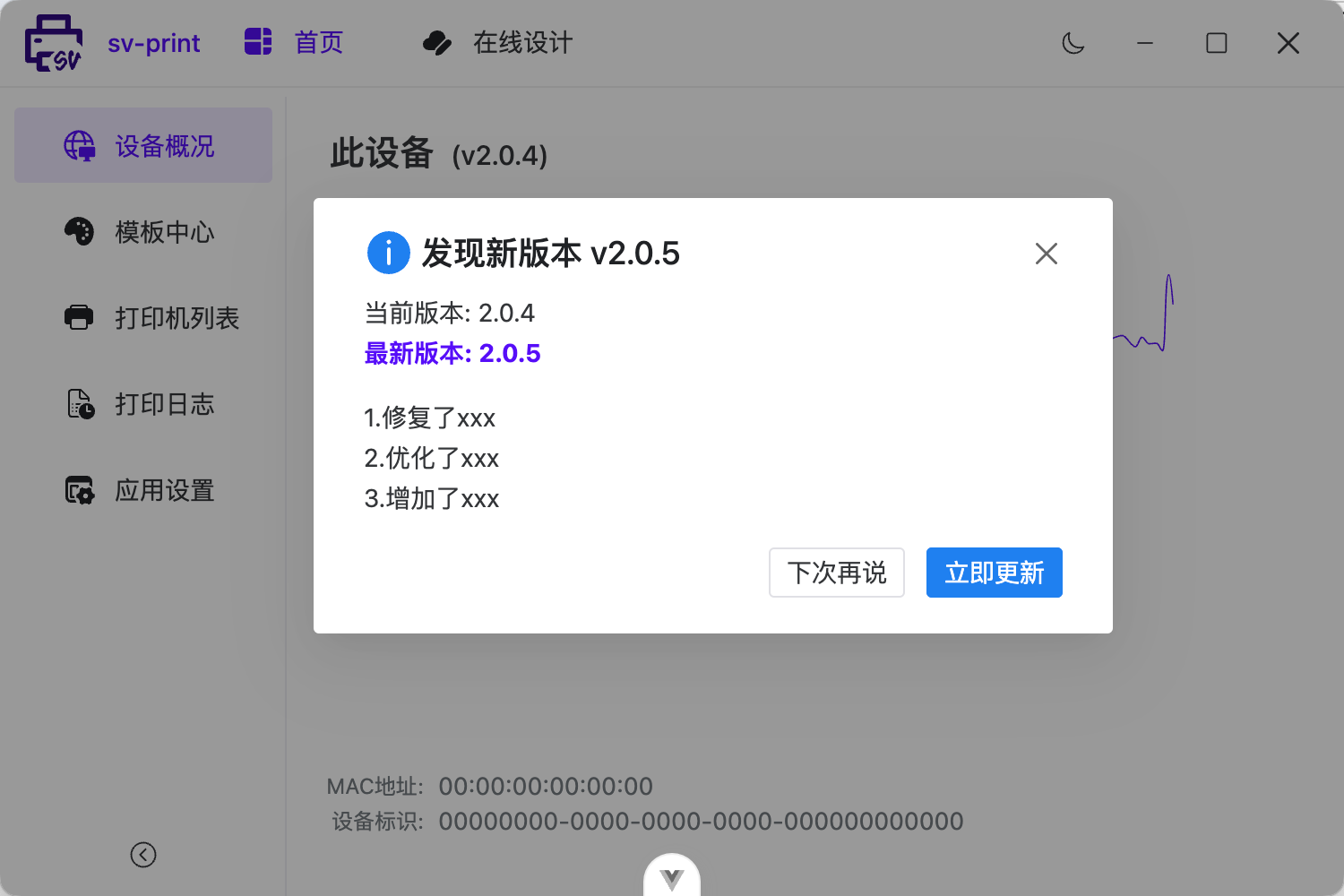
- 🌈 新增支持 应用内更新(全量更新/增量更新).
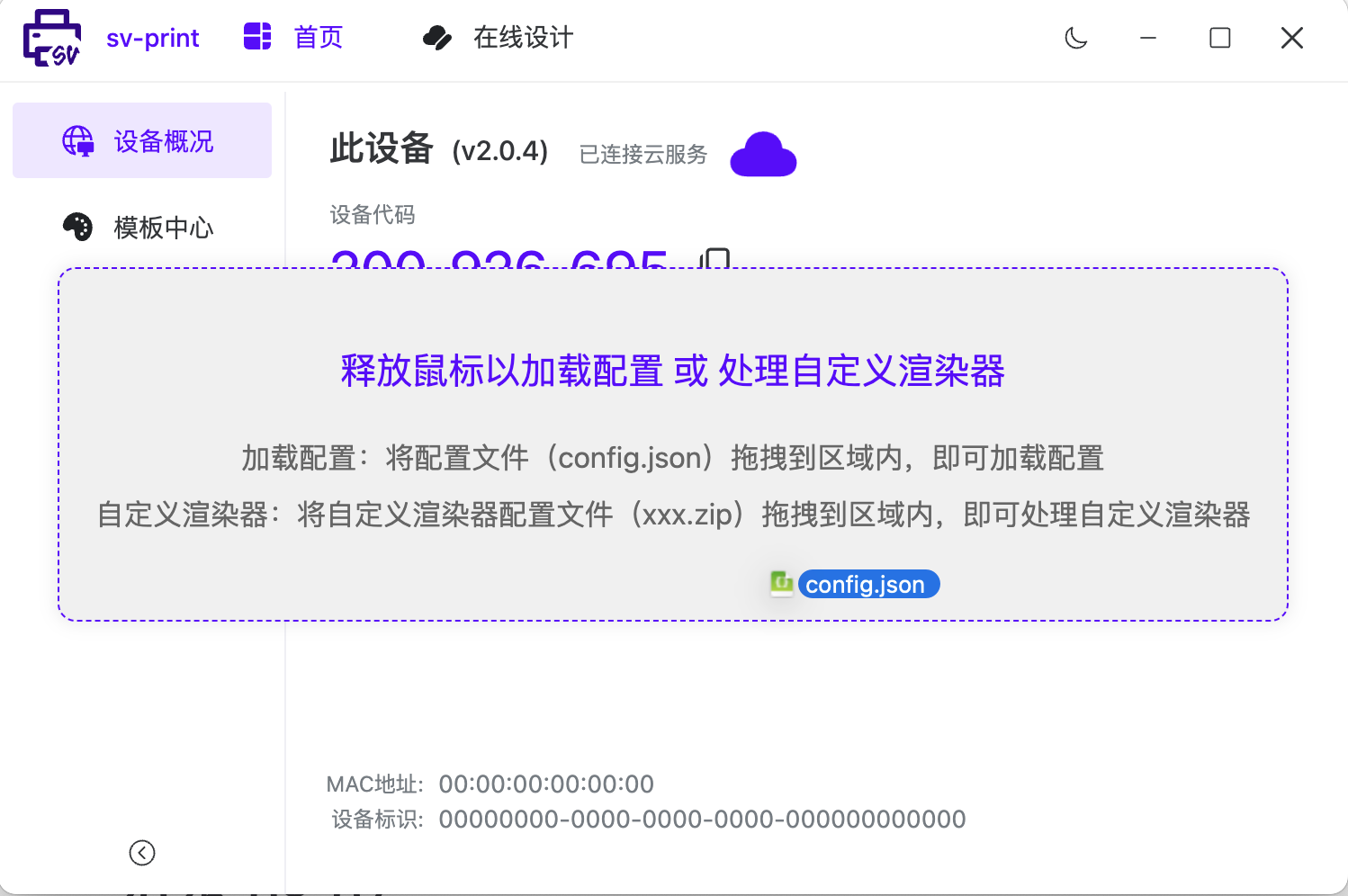
- 🌈 新增支持 拖拽 config.json 更新配置, xxx.zip 更新渲染器.
- 🌈 新增支持 type: capture (兼容render-jpeg)返回图片.
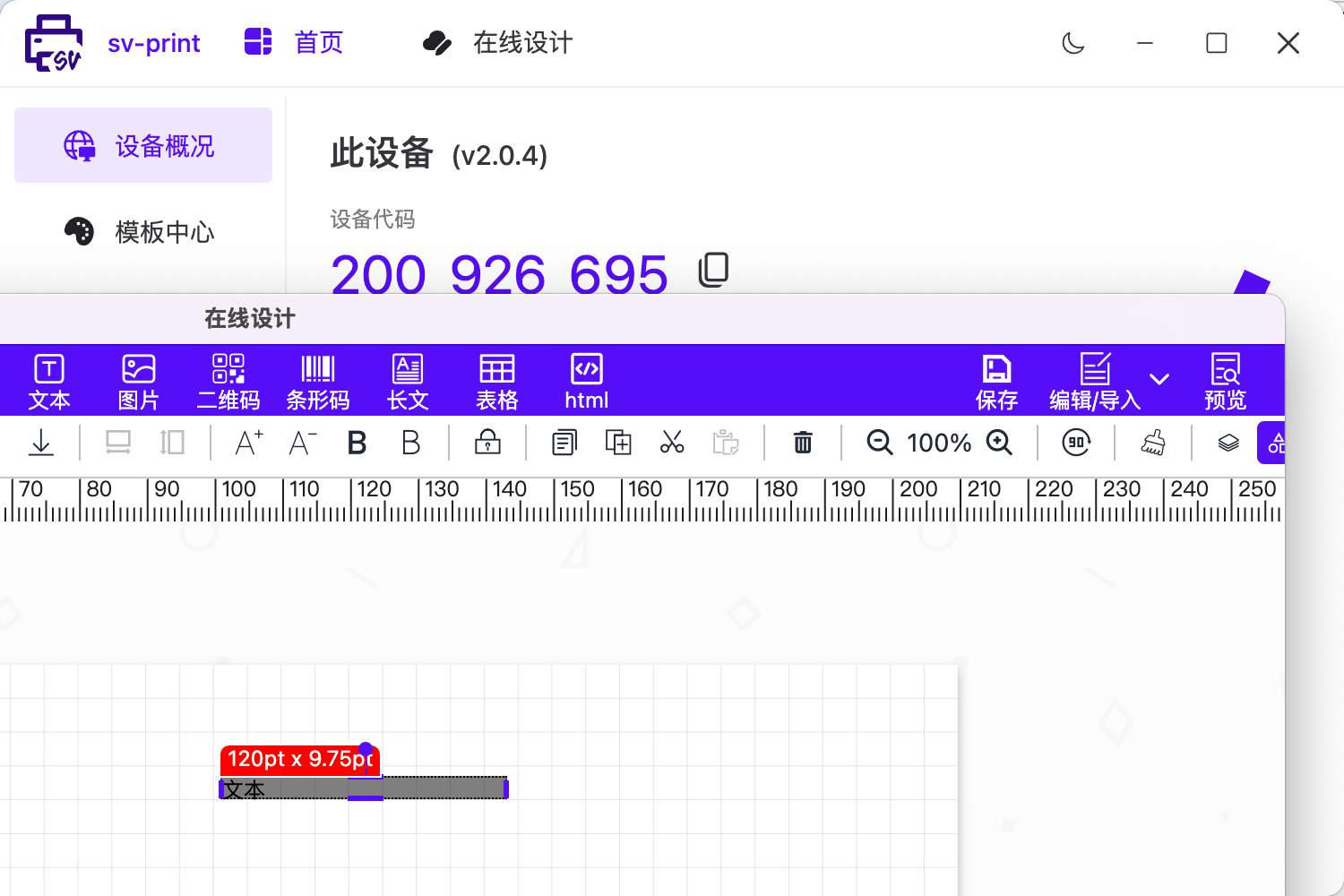
- ✨ 优化 在线设计, 重写 Header: 保存顿号、编辑/导出.
- ✨ 优化 模板中心, 在线设计新增,编辑时 刷新列表.
- ✨ 优化 兼容中转服务, render-xxx API 和 回调 render-xxx-success、render-xxx-error.
- ✨ 优化 更新默认渲染器为最新版本.
- ✨ 优化 托盘菜单 新增:检查更新、重启.
- ✨ 优化 统一在队列执行完成事件中 处理回调事件(支持 socket.io、mqtt)
- ✨ 调整 原pdf缓存路径,改为缓存文件路径(pdfPath -> tempFilePath) 缓存pdf,图片.
🎮 代码示例
这里使用 sv-print 内置的 socket.io 对象, 默认连接 http://localhost:17521/
hiwebSocket.socket.on('success', (e) => {
  console.log(e);
});
hiwebSocket.socket.on('error', (e) => {
  console.log(e);
});
// 兼容 默认的 print2 方法
hiwebSocket.socket.emit('news', {
  // "printer": "PDFwriter",
  type: 'capture',
  // capture 打印  返回的类型 canvas.toDataURL('image/' + captureType) 同时也是扩展名
  captureType: 'jpeg',
  buffer: true,
  // "toNet": true, // 是否仅渲染返回 网络pdf地址
  template: {}, // 模板json
  printData: {}, // 打印数据
  templateId: 'aec8bc1a-f53a-44d4-81dd-13c5a363f612', // 用于 success,error 回调中区分是哪个模板
});
// 可统一使用
hiwebSocket.socket.emit('print', {
  // "printer": "PDFwriter",
  type: 'capture',
  // capture 打印  返回的类型 canvas.toDataURL('image/' + captureType) 同时也是扩展名
  captureType: 'jpeg',
  buffer: true,
  // "toNet": true, // 是否仅渲染返回 网络pdf地址
  template: {}, // 模板json
  printData: {}, // 打印数据
  templateId: 'aec8bc1a-f53a-44d4-81dd-13c5a363f612', // 用于 success,error 回调中区分是哪个模板
});
📷 示例截图
2025-08-07
@sv-print/plugin-text-auto@0.1.0
- 🌈 新增插件 文本字体自适应
🎮 代码示例
import pluginTextAuto from '@sv-print/plugin-text-auto';

let plugins = [
  pluginTextAuto({
    sizeList: [12, 5, 4, 3, 2, 1], // 适应最小字体选项
    maxIterations: 15, // 适应次数
    enablePrecision: true, // 启用精确适应
    precision: 0.5, // 适应精确step
    precisionCount: 10, // 适应精确次数
    lineHeightMode: 'auto', // 行高模式 auto | original | normal | unset
    overrideHidden: false, // 超出是否隐藏
    extendsCss: {
      // 扩展css
      'word-wrap': 'break-word', // 单词换行
    },
  }),
];
2025-08-06
sv-print@0.1.31@sv-print/hiprint@0.2.21
- 🌈 新增 toolbar 新增 水平/垂直间隙、网格对齐工具
- ✨ 优化 新增 setElsGrid API 用于设置元素网格对齐.
🎮 代码示例
// 消除水平间隙
printTemplate?.setElsAlign('clearVer');
// 消除垂直间隙
printTemplate?.setElsAlign('clearHor');
// 默认2列 网格对齐
printTemplate?.setElsAlign('clearGrid');
// 水平间隙
printTemplate?.setElsSpace(10, true);
// 垂直间隙
printTemplate?.setElsSpace(10, false);
// grid网格对齐
const column = 2;
printTemplate?.setElsGrid(column);
2025-08-05
@sv-print/hiprint@0.2.20
- ✨ 优化 表格行/列合并函数,跨页合并显示问题.
2025-08-01
sv-print客户端@2.0.3
- ✨ 新增 MQTT服务,并提供了MQTT在线测试HTML.
- ✨ 新增 预览功能,打印日志支持预览打印的模板/html.支持自定义预览渲染器
- ✨ 优化 在线设计功能,支持新窗口打开,支持自定义设计器地址
- ✨ 优化 模板中心功能,支持自定义API请求
- ✨ fix 多打印机自动创建渲染窗口BUG, 默认最大 3 个渲染窗口.
2025-07-29
sv-print@0.1.30
@sv-print/hiprint@0.2.19
@sv-print/plugin-i18n@0.1.1
✨ 优化 i18n插件,适配右键菜单、插件元素新增属性
✨ 适配 移动端 toolbar i18n
✨ fix 移动端预览多页高度显示问题
✨ 优化 touchZoom 使用 css "zoom" 做缩放
2025-07-25
- sv-print@0.1.29
- @sv-print/hiprint@0.2.18
- @sv-print/plugin-i18n@0.1.0
🌈 新增支持 多语言 i18n 插件
// vue3 为例
<template>
  <Designer :plugins="plugins"></Designer>
</template>
<script setup lang="ts">
import { onMounted, ref } from 'vue';
import { Designer } from '@sv-print/vue3';
// 先安装所需插件: eg: npm i @sv-print/plugin-i18n
// 再引入插件
import pluginI18n, { translateBySelector } from '@sv-print/plugin-i18n';
import en from './i18n/en.json'; // 自己准备多语言文件
const plugins = ref([
  pluginI18n(
    {
      // lng: "英文", // 默认: "简体中文"
      // debug: true, // 调试: 可查看对应语言 缺少的翻译
      resources: {
        // 自定义 key: "英文", 则列表 显示对应的名称
        英文: {
          translation: en,
        },
      },
    },
    (i18next, t, err) => {
      // 回调,干点儿其他的
      console.log('测试翻译', t('文本'));
      // 插件提供的一个 API, 根据 选择器 翻译
      // translateBySelector([".sv-print"]);
    },
  ),
]);
</script>- ✨ 优化 新增hook "onDesigned"、"onPreview"
- ✨ fix: customDataFun 导致表格无法拖拽
- ✨ fix: 元素参数默认值 设置失效问题
2025-07-22
- sv-print@0.1.28
- @sv-print/hiprint@0.2.15
- @sv-print/plugin-ele-bwip-js@0.1.15
- @sv-print/plugin-ele-e2table@0.1.4
- @sv-print/plugin-ele-echarts@0.1.10
- @sv-print/plugin-ele-fabric@0.1.11
🌈 新增支持 设置多个字段名 和 自定义字段名值获取方法
// 第3个参数 printData, 兼容表格列数据获取.
const customDataFun = (data, field, printData) => {
  let fieldData;
  const fieldList = `${ field }`.split(",");
  const len = fieldList.length;
  for (var i = 0; i < len; i++) {
    const f = fieldList[i];
    const curData = (f.split(".").reduce((a, c) => (a ? a[c] : data ? data[c] : ""), false) || "");
    // 如果是表格: curData 是个对象哟
    if (typeof curData == "object") {
      if (Array.isArray(curData)) {
        fieldData = [...fieldData || [], ...curData];
      } else {
        fieldData = {...fieldData || {}, ...curData};
      }
    } else {
      const connector = i == 0 ? '' : '->'
      // 有必要考虑 number 情况么?
      fieldData = `${ (fieldData || '') }${ connector }${ curData }`;
    }
  }
  return fieldData;
};
// 组件中
const fun = ref(customDataFun);
<Designer :customDataFun = "fun" / >
// 或者
const hiprintTemplate = new hiprint.PrintTemplate({
  template: panel, // 模板
  customDataFun: customDataFun,
});
// 或者
hiprintTemplate.setCustomDataFun(customDataFun);
🌈 调整优化 组件内编辑器新增清空 复制按钮
- ✨ fix 行列合并函数, 跨页首行colspan列数显示问题
- ✨ 优化 register api
2025-07-11
- sv-print@0.1.25
- @sv-print/hiprint@0.2.13
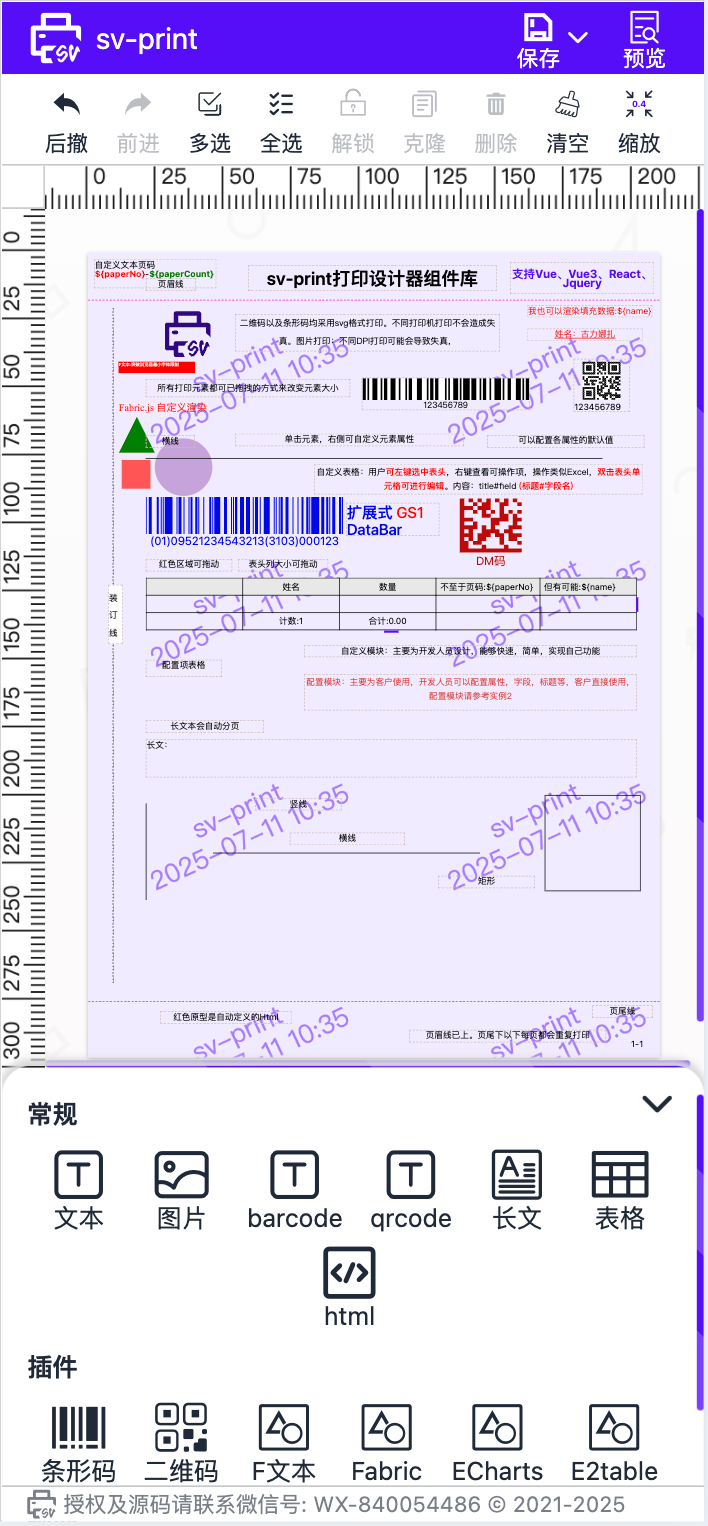
🌈 调整优化 支持触摸事件 & 适配移动端UI
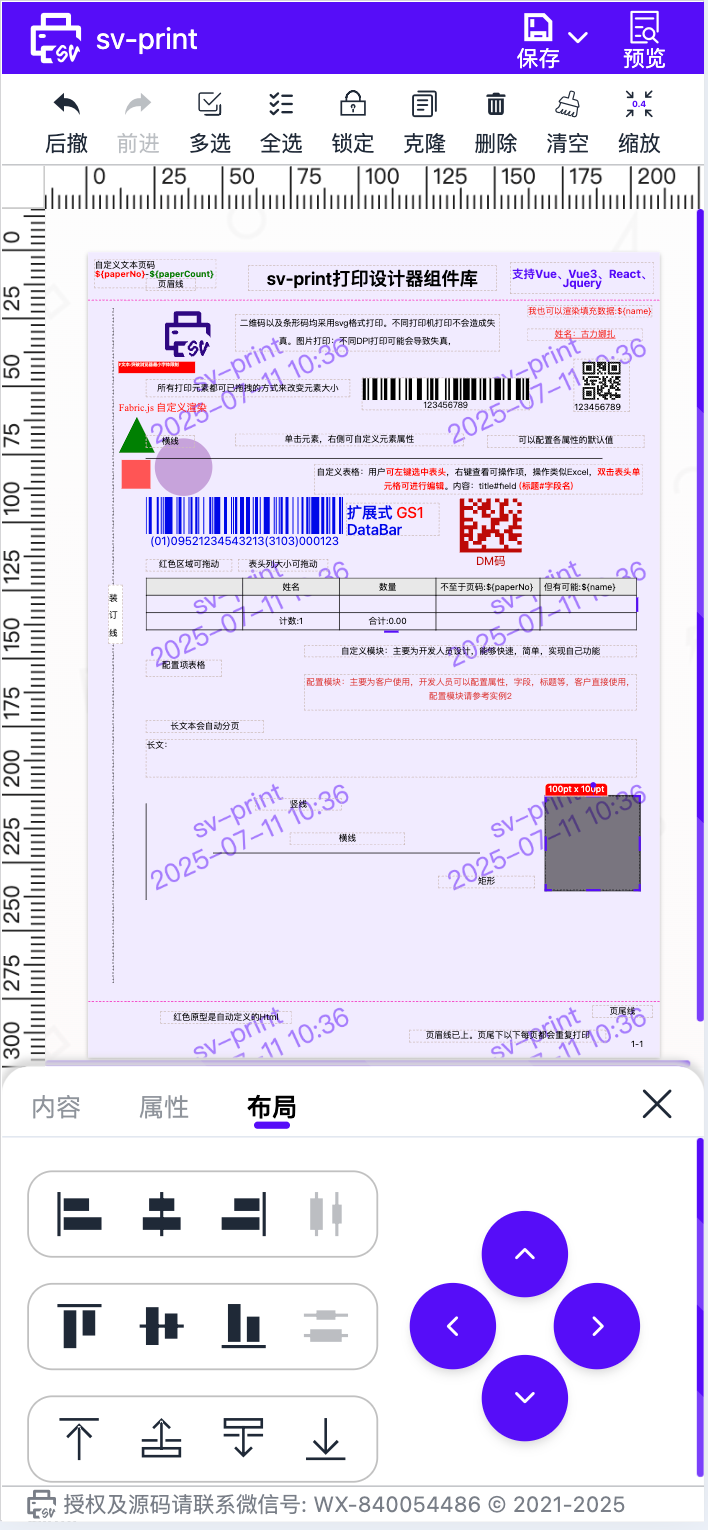
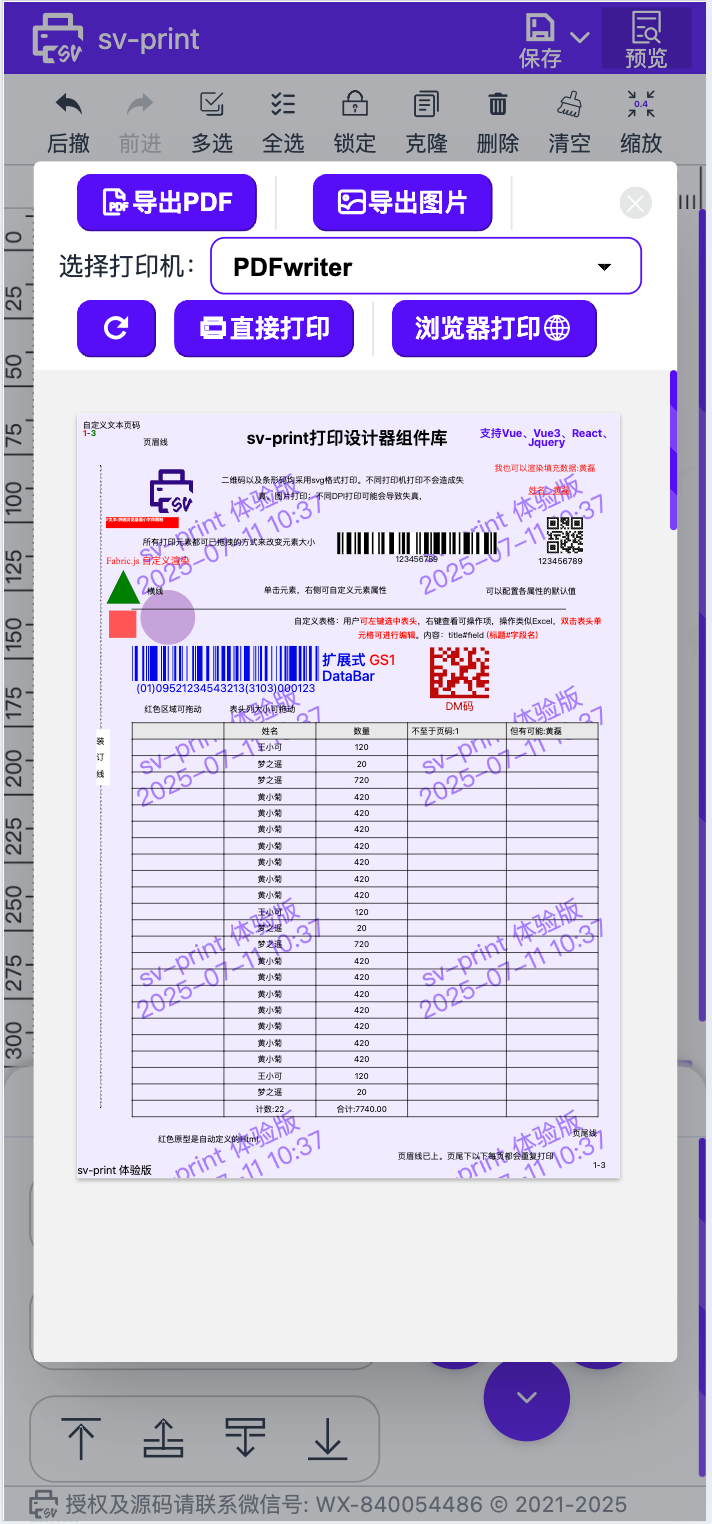
🌈 新增支持 touchZoom 方法,以适配移动端预览双指缩放
const box = globalThis.$('#preview_content .hiprint-printPaper');
const ww = window.innerWidth - 64; // 64: 边距
const tw = box.width();
const zoom = Math.round((ww / tw) * 100) / 100;
box.css({
  transform: `scale(${zoom})`,
  'transform-origin': '0px 0px',
});
globalThis.$(box).touchZoom({
  minScale: 0.2,
  maxScale: 6.0,
  transform: true, // 启用 transform 缩放
});
🌈 新增支持 ${paperNo} ${paperCount} 和 ${field} 值替换
// 编辑就完了🌈 新增支持 addPrintElementToPaperByTid 根据 tid 添加元素
printTemplate?.addPrintElementToPaperByTid('defaultModule.text');
// 添加到指定位置 pt
const left = 10;
const top = 30;
printTemplate?.addPrintElementToPaperByTid('defaultModule.text', left, top);
🌈 新增支持 providerMap 支持传自定义渲染函数 --> hiprint.PrintElementTypeManager.build 支持自定义 渲染可拖拽元素
const providerMap = ref({
  container: '.hiprintEpContainer',
  value: 'defaultModule',
  render: (list) => {
    let container = globalThis.$('<div class="hiprint-printElement-type"></div>');
    // xxx
    return container;
  },
});

hiprint.PrintElementTypeManager.build('.hiprintEpContainer', 'defaultModule', (list) => {
  let container = globalThis.$('<div class="hiprint-printElement-type"></div>');
  list.forEach(function (item) {
    const box = globalThis.$(`
          <div class="draggable-ele-group">
            <span class="title">${item.name}</span>
            <div class="list"></div>
          </div>
          `);
    const typeList = box.find('.list');
    item.printElementTypes.forEach(function (t) {
      typeList.append(`
              <div class="draggable-ele ep-draggable-item" tid=${t.tid}>
                <i class="svicon sv-base sv-${t.type}"></i>
                <p style="white-space:nowrap">${t.getText()}</p>
              </div>
          `);
    });
    container.append(box);
  });
  return container;
});
🌈 调整优化 setElsAlign 支持对齐纸张;单项默认对齐纸张, 多选按住 ctrl/command 键可批量对齐
printTemplate?.setElsAlign('left', true);
printTemplate?.setElsAlign('right', true);
🌈 调整优化 锁定元素 禁止调整大小 & 全局配置 disableNoDraggableSize 默认 true
hiprint.setConfig({
  disableNoDraggableSize: false, // 锁定元素,可编辑属性 宽高大小
});
🌈 调整新增 buildPagination 构建多面板菜单
// 手动构建多面板菜单
printTemplate.buildPagination('#printPanels');- ✨ 优化 导出PDF,导出图片部分元素清晰度 & 导出图片支持 quality: 0~1
- ✨ 优化 双击编辑功能(可编辑为html)
- ✨ 优化 删除元素逻辑(锁定元素,全选元素) & 右键菜单删除情况
- ✨ 优化 预览支持设置是否隐藏 导出图片,导出PDF以及直接打印按钮
- ✨ 优化 全选时触发元素选中事件
- ✨ 优化 designer 组件传 template 为模板对象时,默认事件处理
- ✨ fix setConfig 方法可能导致 tab 显示错误问题
2025-06-26
- sv-print@0.1.23
- @sv-print/hiprint@0.2.11
- @sv-print/vue@0.1.20
- @sv-print/vue3@0.1.20
- @sv-print/react@0.1.20
- @sv-print/plugin-ele-bwip-js@0.1.14
- @sv-print/plugin-ele-e2table@0.1.3
- @sv-print/plugin-ele-echarts@0.1.9
- @sv-print/plugin-ele-fabric@0.1.10
🌈 优化 hiprint.setConfig 方法, 支持扩展插件元素属性 & 支持before
hiprint.setConfig({
  // 插件新元素的 元素属性
  xxx: {
    tabs: [{}],
  },
  text: {
    tabs: [
      {},
      // 当修改第二个 tabs 时,必须把他之前的 tabs 都列举出来.
      {
        name: '样式',
        options: [
          {
            name: 'scale',
            before: 'color', // 自定义参数,插入在 color 之前
            hidden: false,
          },
        ],
      },
    ],
  },
});
🌈 新增 hiprint.getOptionItems 查看所有元素参数对象, 新增 getOptionItem hook
// 元素的所有参数对象
const optionItems = hiprint.getOptionItems;

// hook getOptionItem
const getOptionItemHook = {
  hook: 'getOptionItem',
  name: '对元素参数做一个包装',
  description: '渲染元素属性时,构建更多值,或者做多语言处理',
  priority: 1,
  run: (item) => {
    // 示例 给 元素属性 添加一个 data-name 属性
    const oldCreate = item.createTarget;
    item.createTarget = function (...args) {
      const target = oldCreate.call(item, ...args);
      console.log(target);
      target.attr({
        'data-name': item.name,
      });
      return target;
    };
    return item;
  },
};
🌈 vue/vue3/react 组件新增导出 Header 组件
import { Header } from '@sv-print/vue';
import { Header } from '@sv-print/vue3';
import { Header } from '@sv-print/react';
🌈 toolbar 新增 setZoom 方法 设置默认缩放
const onDesigned = (e) => {
  const { designerUtils } = e.detail;
  designerUtils.toolbar.setZoom(1.5);
};- ✨ 优化 水印内容 支持 ${name} 取打印数据中的字段值
- ✨ 优化 缩放时 元素的 [位置大小],[删除按钮] 缩放问题
- ✨ 修复 插件[plugin-ele-fabric] fText 元素宽高问题
- ✨ 优化 插件[plugin-scale] 点击元素 位置偏移问题
- ✨ 优化 插件[bwip-js,fabric,echarts,e2table] 支持扩展元素参数
- ✨ 修复 插件[plugin-ele-echarts] 部分图表渲染问题
- ✨ 修复 文本 writing-mode 对 resize-panel 的影响
- ✨ fix 表格 列渲染 条形码/二维码 导出pdf问题
- ✨ fix 删除元素时 of null (reading 'className'), 组件销毁时 cloneNode error
版权所有
版权归属: